> ## Documentation Index
> Fetch the complete documentation index at: https://docs.coloop.ai/llms.txt
> Use this file to discover all available pages before exploring further.
# Concept & Message Testing
> These guides cover how to work with stimulus for ad, concept, or product testing in CoLoop, outlining best practices and direct you to the relevant guidance for your specific study type.
Concept testing projects are particularly challenging for AI tools as they often struggle to disambiguate similar concepts. CoLoop features a specialised concept testing mode that can be enabled during project setup.
## What does concept testing mode do?
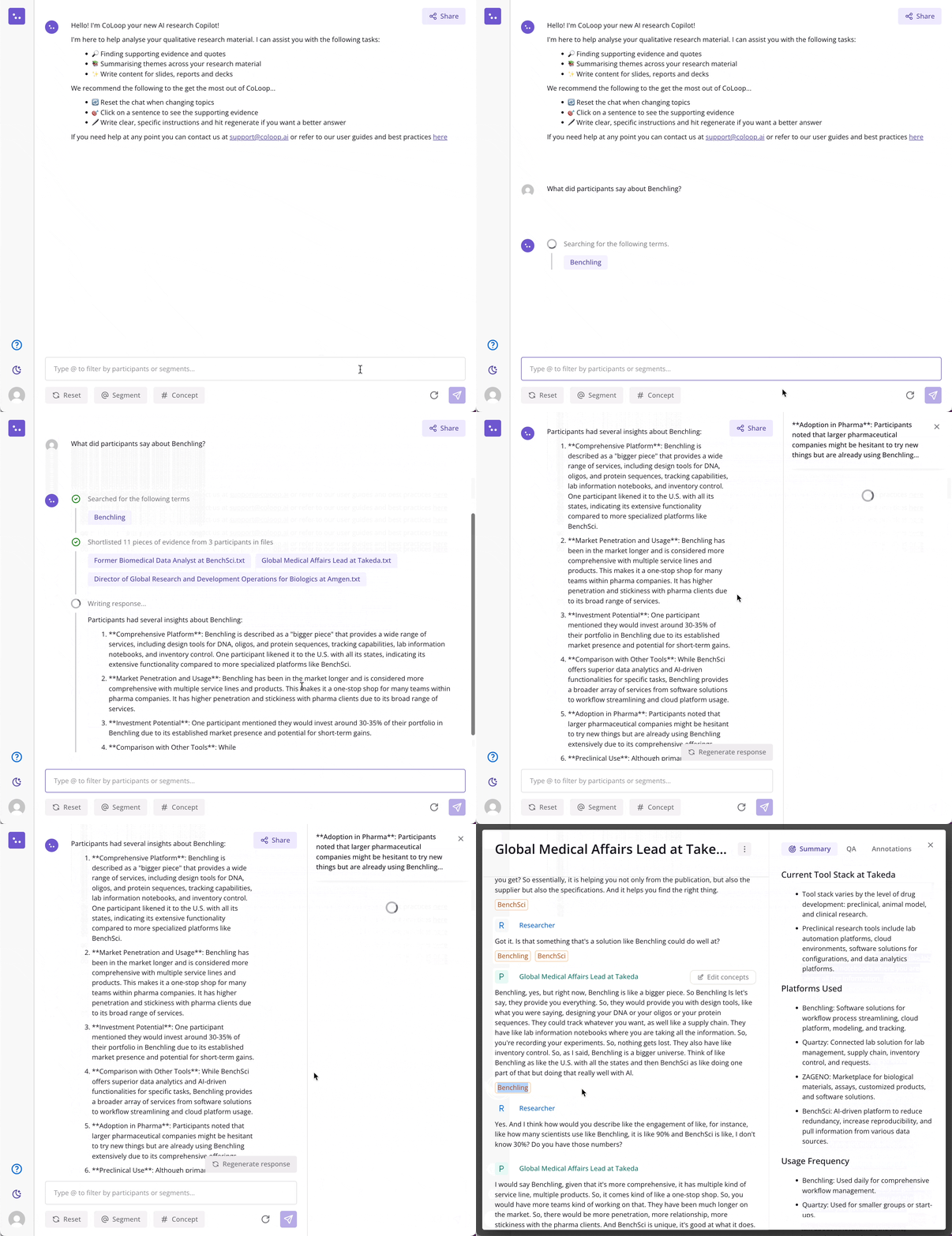
Concept testing mode enables you to enter a list of concepts, brand names or any other key phrase during the project setup. The AI will automatically label text segments where they appear and even track when the conversation changes from discussing one to another.
* These will appear in the transcripts and evidence panel
* Concepts entered here will be passed into the Key Phrases section when transcribing any audio or video files.
 ## How does it work?
CoLoop supports two different concept testing methods, designed to fit different study designs and data collection methods.
1. Concept Testing with No Stimulus Deck: Use this method when you are collecting data in person, don't have access to video, or are presenting dynamic concepts online (e.g. figma or a website).
2. Concept Testing with a Stimulus Deck (Colour Tagging): Use this method when you are collecting data online and will be showing the concepts on a stimulus deck while screen sharing. CoLoop has developed a unique approach for this called Colour Tagging.
Both of these methods require a bit of planning prior to data collection, so please read the relevant guidance before data collection begins. This will ensure you have the smoothest experience and will increase concept detection accuracy.
Use when are collecting data in person, don't have access to video, or are presenting dyanmic concepts online (e.g website or figma).
Use when you are collecting data online and will be showing the concepts on a stimulus deck while screen sharing. Requires preparation advance preparation of stimulus deck.
For studies that require multiple stimulsu decks, such as multi-market. Use when you are collecting data online and will be showing the concepts on a stimulus deck while screen sharing.
## How does it work?
CoLoop supports two different concept testing methods, designed to fit different study designs and data collection methods.
1. Concept Testing with No Stimulus Deck: Use this method when you are collecting data in person, don't have access to video, or are presenting dynamic concepts online (e.g. figma or a website).
2. Concept Testing with a Stimulus Deck (Colour Tagging): Use this method when you are collecting data online and will be showing the concepts on a stimulus deck while screen sharing. CoLoop has developed a unique approach for this called Colour Tagging.
Both of these methods require a bit of planning prior to data collection, so please read the relevant guidance before data collection begins. This will ensure you have the smoothest experience and will increase concept detection accuracy.
Use when are collecting data in person, don't have access to video, or are presenting dyanmic concepts online (e.g website or figma).
Use when you are collecting data online and will be showing the concepts on a stimulus deck while screen sharing. Requires preparation advance preparation of stimulus deck.
For studies that require multiple stimulsu decks, such as multi-market. Use when you are collecting data online and will be showing the concepts on a stimulus deck while screen sharing.