

Large audio and video files can be imported directly into CoLoop for analysis from One Drive. One Drive is typically used by independent 3rd party moderators working out of personal accounts for sharing large files. This integration can be used to import large video or audio files directly into CoLoop.Documentation Index
Fetch the complete documentation index at: https://docs.coloop.ai/llms.txt
Use this file to discover all available pages before exploring further.
Importing a file
MS OneDrive currently has a bug a which means users need to order / reorder the list of files for them to show up when opening this for the first time
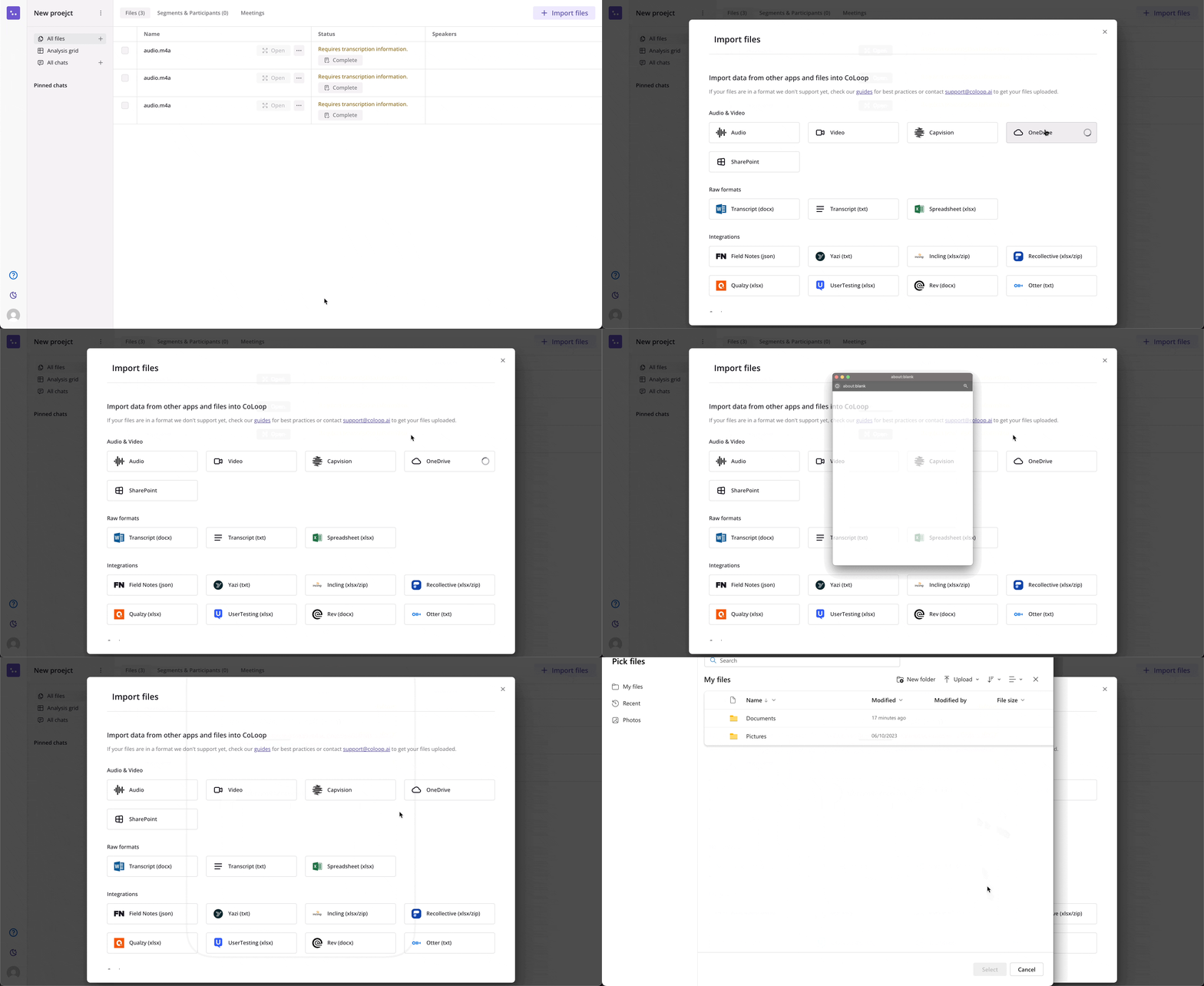
- Click Import Files inside a CoLoop project
- Click the OneDrive button in the upload modal
- Follow the instructions to sign in securely to One Drive
- Choose the file(s) you want to import and press select
Recommended Articles
Live Interviews
This article outlines a quick start guide and some best practices for analysing Live Interviews in CoLoop
Creating a Transcript
This article explains best practices, language support as well as tips and tricks for getting the most out of CoLoop’s transcription
Video & Audio
This article provides additional details on working with Audio & Video files within CoLoop including supported formats and best practices