Ask questions about an analysis grid, compare groups of participants, and add or remove columns and rows by describing what you want.
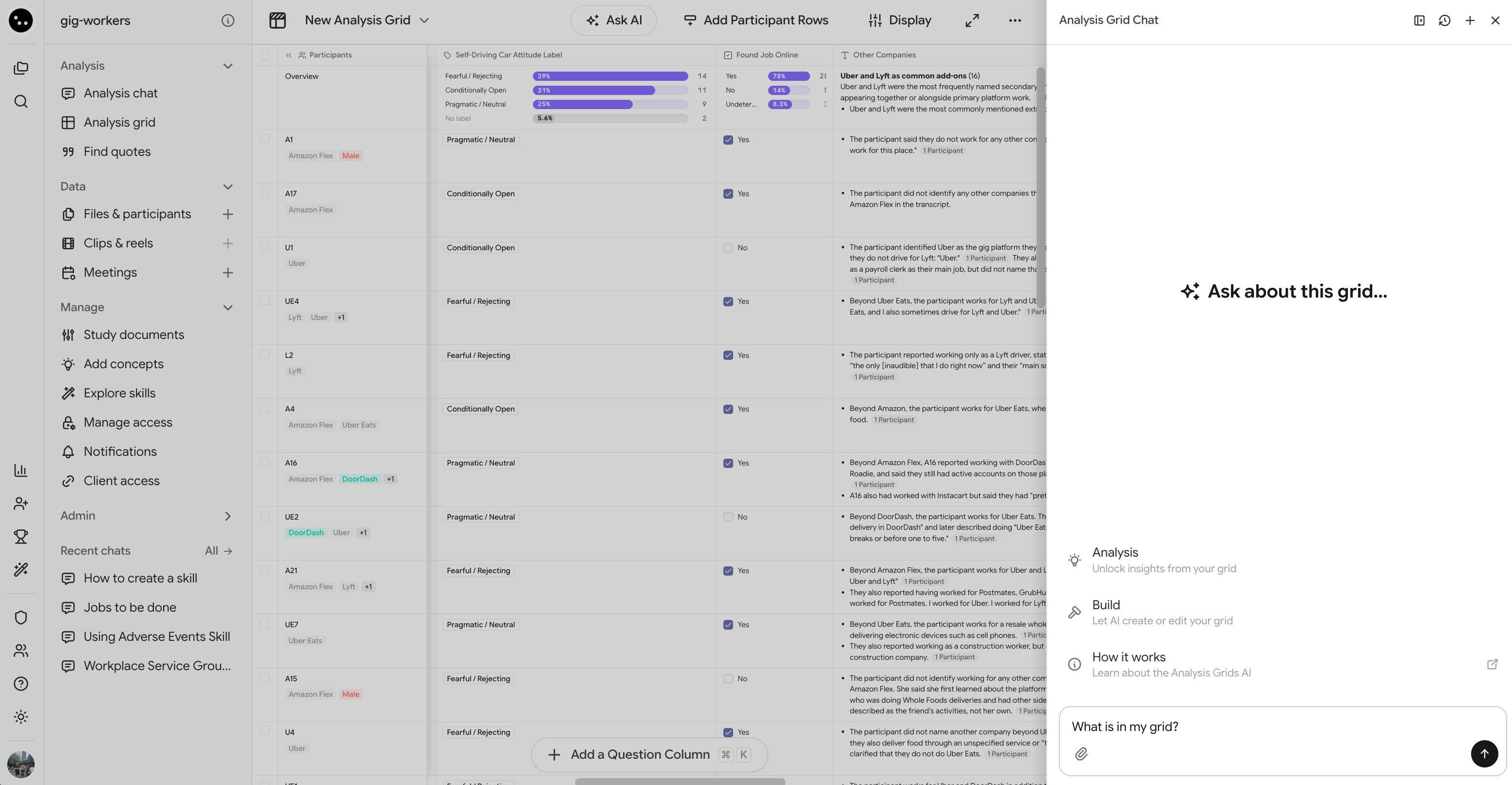
AI Grids Chat is an AI chat that sits beside your grid. Use it to summarize what the grid has found, ask questions that span several columns, compare groups of participants, and add or remove columns and rows without opening a dialog.The chat works from the answers your grid has already computed. It reads the same cells and overviews you see, and cites them, so you can trace every claim back to the transcript.
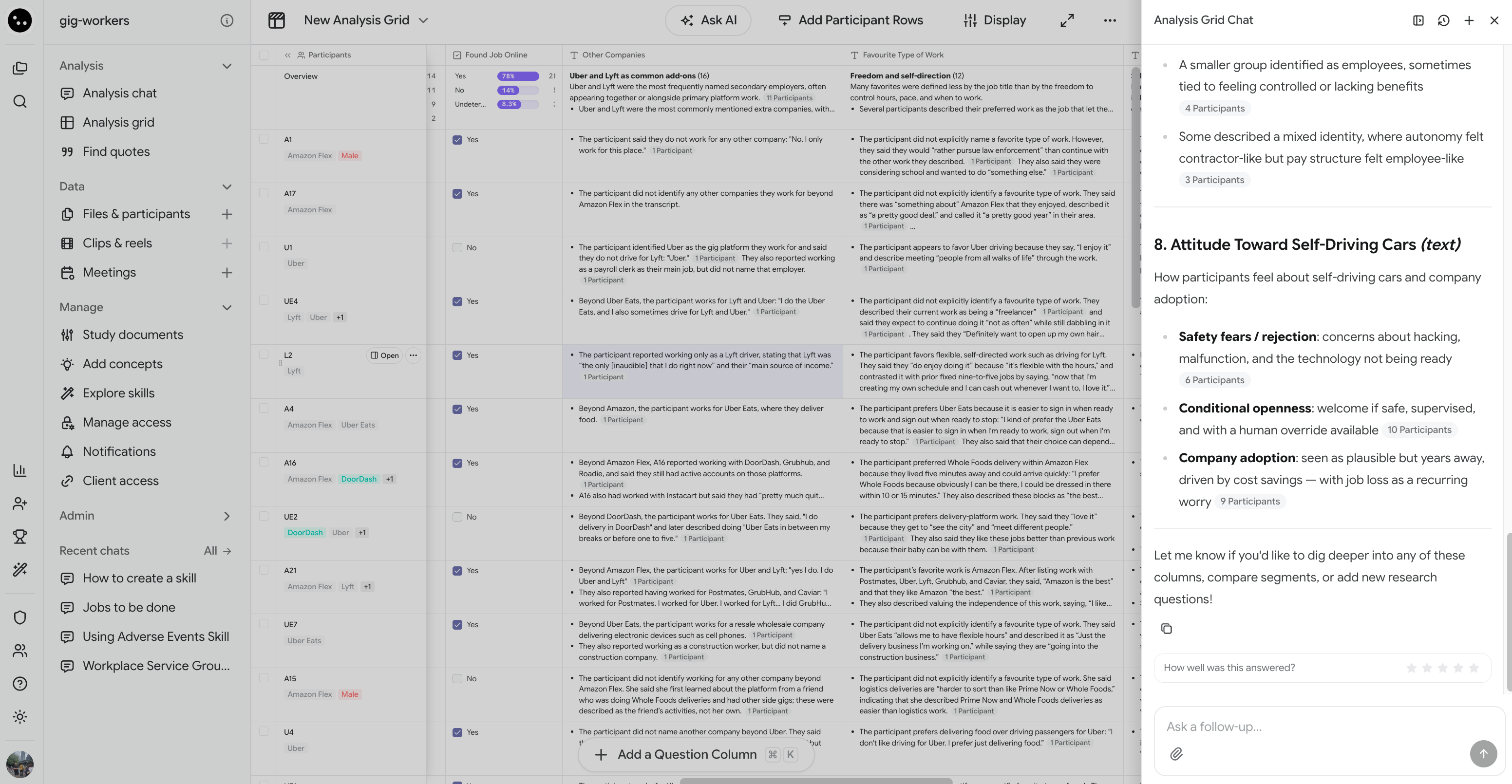
The Analysis Grid Chat panel opens beside the grid. Click Ask AI again, or the X in the panel, to close it. Closing and reopening the panel keeps your current conversation.
Ask the chat anything you’d ask a colleague who has read the whole grid. For example:
“Give me an overview of this grid.”
“What do people say about pricing, and how does that relate to their satisfaction score?”
“Find quotes where people describe onboarding as confusing.”
“How many participants answered Yes to the trial question?”
The chat gives one combined answer, with citations. Click a citation to open the Citation sources panel and read the quote in context. See Check the evidence for what you can do from there.Counts and percentages for Yes / No and Categorization columns come straight from the grid’s computed distributions, so they match the Overview row exactly.
Name the group you’re interested in, and the chat narrows its reading to the matching rows. You can describe the group by:
Column values — “participants who answered No to the trial question” or “rows labeled Price sensitive.”
A judgment — “people who sound frustrated about setup.”
Participants or segments — “the Power Users segment compared to everyone else.”
For example: “Compare what Power Users and new customers say about onboarding.”Narrowing the chat’s reading doesn’t filter or sort your grid on screen. To change what you see, use Sort and filter what you see.
Click the paperclip to attach up to four files per message, such as a brief, a codebook, or a screenshot. You can also drag a file into the panel or paste a screenshot.The chat reads attached files to understand your request, but they aren’t part of the grid’s data. Answers drawn from an attachment don’t carry citations.
If you can edit the grid, you can ask the chat to:
Add columns — “Add a Yes/No column asking whether they’d recommend us to a friend.” The chat can add any output type and drafts labels for Categorization columns.
Add rows — for specific participants or segments, all participants, all segments, or every participant in a segment. Ask for a combined row to merge several into one.
Remove columns — “Remove the pricing columns.”
Remove rows — by name, or by a description such as “rows for participants in the Churned segment.”
The chat only changes the grid when you ask it to. If it thinks a change would help, it suggests it and waits for you to confirm.Changes apply as soon as the chat makes them, for everyone with access to the grid. New cells compute in the background, the same way they do when you add a column yourself. Each column the chat adds counts as one question against your plan’s usage. CoLoop skips columns and rows that duplicate ones already in the grid, and doesn’t charge for skipped columns.
Removing a column or row deletes its answers, and there’s no undo. Citations elsewhere that point to the removed answers stop working. Check what the chat plans to remove before you confirm.
Edit an existing column or row. To change a question, open the column’s menu and click Edit column. To change who a row covers, use Edit row. See Manage columns and Manage rows.
Sort, filter, or change the display of the grid on screen.
Edit without edit access. If you can only view the grid, the chat answers questions but tells you it can’t make changes. Ask an editor, or see Sharing analysis grids and AI chats.
You can have the chat set up a grid for you when you create it.
In your project sidebar, click Analysis grid, then the + Analysis grid card.
Give the grid a name.
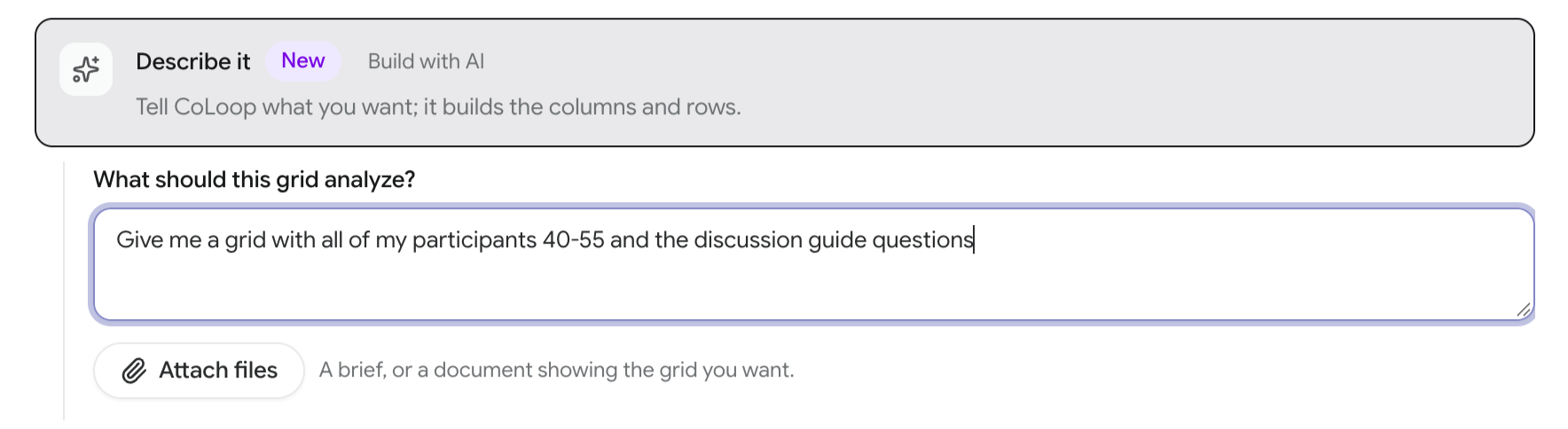
Choose Describe it.
Under What should this grid analyze?, describe the questions and rows you want. To copy an existing layout, click Attach files and add a brief or a document that shows the grid you want.
Click Create grid.
The grid opens with the chat already running, and you can watch the columns and rows arrive. If your description doesn’t mention rows, the chat adds one row per participant. When it’s done, keep chatting to refine the grid.
Cells are still computing. The chat won’t answer from a half-finished column. It tells you how many cells are still computing. Wait for them to finish, then ask again.
“I could not work out how to run that against your grid.” Rephrase your request. Naming the columns you mean helps.
“Something went wrong.” Click Try again.
“Couldn’t load this chat.” Click Try again, or start a new chat with +.
Was this page helpful?
{"docsConfig":{"theme":"mint","$schema":"https://mintlify.com/docs.json","name":"CoLoop.ai","colors":{"primary":"#7017FF","light":"#23C2A0","dark":"#7017FF"},"logo":{"light":"https://mintcdn.com/coloop/ymQOqY80NhE9wNnz/logos/logo-black.png?fit=max\u0026auto=format\u0026n=ymQOqY80NhE9wNnz\u0026q=85\u0026s=501017bf15d7cff7dc78de97ccbe006f","dark":"https://mintcdn.com/coloop/ymQOqY80NhE9wNnz/logos/logo-white.png?fit=max\u0026auto=format\u0026n=ymQOqY80NhE9wNnz\u0026q=85\u0026s=554fc014c777c89d3ba5e41a9c42ac87"},"favicon":"https://mintcdn.com/coloop/ymQOqY80NhE9wNnz/logos/logo.svg?fit=max\u0026auto=format\u0026n=ymQOqY80NhE9wNnz\u0026q=85\u0026s=4c7d6e11e692e032a4c7e817d8cd5397","navbar":{"links":[{"href":"https://coloop-knowledge-base.help.usepylon.com","label":"Knowledge Base"},{"href":"https://app.coloop.ai","label":"Go to CoLoop"}],"primary":{"type":"button","label":"Book a Demo","href":"https://www.coloop.ai/contact?utm_source=docs\u0026utm_medium=header"}},"footer":{"socials":{"linkedin":"https://www.linkedin.com/company/coloopai"}},"integrations":{"posthog":{"apiKey":"phc_Tnk3gSqgaBU81FaieZjtfxbk3lGXC6jGGDxGyrl4z3f","apiHost":"https://eye.coloop.ai","sessionRecording":true}},"styling":{"latex":false},"navigation":{"global":{"anchors":[{"anchor":"Book a Demo","icon":"calendar-days","href":"https://www.coloop.ai/contact?utm_source=docs\u0026utm_medium=sidebar"},{"anchor":"Community","icon":"fire-flame-curved","href":"https://community.coloop.ai/users/sign_in"},{"anchor":"Back to CoLoop","icon":"house","href":"https://app.coloop.ai"}]},"pages":[]}},"deployment":{"deploymentMetadataValue":{"subdomain":"coloop","hasAudioNarration":false,"actualSubdomain":"coloop","customDomains":["docs.coloop.ai"],"gitSource":{"type":"github","owner":"genei-ltd","repo":"coloop","deployBranch":"main","contentDirectory":"apps/docs","isPrivate":true,"mountPath":"","label":""},"chroma":{"liveDeploymentHistoryId":"6adb92c35916e893411703cf","collectionId":"935d5633-be5a-4c61-b026-c34442e4d301","schemaVersion":"v3","latestBuiltDeploymentHistoryId":"6adb92c35916e893411703cf"},"feedback":{"thumbs":true},"entitlements":{"AI_CHAT":{"status":"ENABLED"},"REMOVE_BRANDING":{"status":"DISABLED"},"CONTEXTUAL_FEEDBACK":{"status":"DISABLED"},"CODE_SNIPPET_FEEDBACK":{"status":"DISABLED"},"WEB_MCP":{"status":"ENABLED"},"NARRATION":{"status":"ENABLED"}},"buildId":"6adb92c35916e893411703cf","clientVersion":"0.0.3952","searchFilterCounts":[{"language":"default","tag":"Documentation","count":68},{"language":"default","tag":"Integrations","count":38},{"language":"default","tag":"Setting up a project","count":12},{"language":"default","tag":"Collaboration \u0026 Access Management","count":10},{"language":"default","tag":"Analysis Chat","count":7},{"language":"default","tag":"AI Skills Hub","count":5},{"language":"default","tag":"Advanced Analysis","count":5},{"language":"default","tag":"Analysis Grids","count":5},{"language":"default","tag":"Getting Started","count":5},{"language":"default","tag":"API","count":4}]},"assistantConfig":{},"hasChatPermissions":true,"hasWebMcpPermissions":true,"toggles":[{"name":"kill-isr","enabled":true,"variant":{"name":"disabled","enabled":false,"feature_enabled":true},"impressionData":false},{"name":"agent-mintlify-slack","enabled":true,"variant":{"name":"disabled","enabled":false,"feature_enabled":true},"impressionData":false},{"name":"editor-v7-file-tree","enabled":true,"variant":{"name":"disabled","enabled":false,"feature_enabled":true},"impressionData":false},{"name":"agent-integrations-settings","enabled":true,"variant":{"name":"disabled","enabled":false,"feature_enabled":true},"impressionData":false},{"name":"automations-pr-grouping","enabled":true,"variant":{"name":"disabled","enabled":false,"feature_enabled":true},"impressionData":false},{"name":"custom-prefix","enabled":true,"variant":{"name":"disabled","enabled":false,"feature_enabled":true},"impressionData":false},{"name":"analytics-v7","enabled":true,"variant":{"name":"disabled","enabled":false,"feature_enabled":true},"impressionData":false},{"name":"user-flows-analytics","enabled":true,"variant":{"name":"disabled","enabled":false,"feature_enabled":true},"impressionData":false},{"name":"no-publish-flow","enabled":true,"variant":{"name":"disabled","enabled":false,"feature_enabled":true},"impressionData":false},{"name":"workos-onboarding","enabled":true,"variant":{"name":"disabled","enabled":false,"feature_enabled":true},"impressionData":false},{"name":"llms-txt-v2","enabled":true,"variant":{"name":"disabled","enabled":false,"feature_enabled":true},"impressionData":false},{"name":"pause-universal-search-reconcile","enabled":true,"variant":{"name":"disabled","enabled":false,"feature_enabled":true},"impressionData":false},{"name":"snapshot-serving-live","enabled":true,"variant":{"name":"disabled","enabled":false,"feature_enabled":true},"impressionData":false},{"name":"stripTemperatureMiddleware","enabled":true,"variant":{"name":"disabled","enabled":false,"feature_enabled":true},"impressionData":false},{"name":"per-site-search-delta","enabled":true,"variant":{"name":"disabled","enabled":false,"feature_enabled":true},"impressionData":false},{"name":"support-platform-pylon-zendesk","enabled":true,"variant":{"name":"disabled","enabled":false,"feature_enabled":true},"impressionData":false},{"name":"snapshot-serving","enabled":true,"variant":{"name":"disabled","enabled":false,"feature_enabled":true},"impressionData":false},{"name":"instant-rollback","enabled":true,"variant":{"name":"disabled","enabled":false,"feature_enabled":true},"impressionData":false},{"name":"granular-notifications-server","enabled":true,"variant":{"name":"disabled","enabled":false,"feature_enabled":true},"impressionData":false},{"name":"granular-notifications","enabled":true,"variant":{"name":"disabled","enabled":false,"feature_enabled":true},"impressionData":false},{"name":"editor-private-page-search","enabled":true,"variant":{"name":"disabled","enabled":false,"feature_enabled":true},"impressionData":false},{"name":"automations-fable","enabled":true,"variant":{"name":"disabled","enabled":false,"feature_enabled":true},"impressionData":false},{"name":"fixed-ai-action-pricing","enabled":true,"variant":{"name":"disabled","enabled":false,"feature_enabled":true},"impressionData":false},{"name":"automation-resolve-merge-conflict","enabled":true,"variant":{"name":"disabled","enabled":false,"feature_enabled":true},"impressionData":false},{"name":"scoped-publishing","enabled":true,"variant":{"name":"disabled","enabled":false,"feature_enabled":true},"impressionData":false},{"name":"mintql","enabled":true,"variant":{"name":"disabled","enabled":false,"feature_enabled":true},"impressionData":false},{"name":"page-level-analytics","enabled":true,"variant":{"name":"disabled","enabled":false,"feature_enabled":true},"impressionData":false},{"name":"editor-version-history-v2","enabled":true,"variant":{"name":"disabled","enabled":false,"feature_enabled":true},"impressionData":false},{"name":"editor-nav-generations","enabled":true,"variant":{"name":"disabled","enabled":false,"feature_enabled":true},"impressionData":false},{"name":"billing-page-v2","enabled":true,"variant":{"name":"disabled","enabled":false,"feature_enabled":true},"impressionData":false},{"name":"workspace-projects","enabled":true,"variant":{"name":"disabled","enabled":false,"feature_enabled":true},"impressionData":false},{"name":"assistant-v5","enabled":true,"variant":{"name":"disabled","enabled":false,"feature_enabled":true},"impressionData":false},{"name":"byok-sep-25","enabled":true,"variant":{"name":"disabled","enabled":false,"feature_enabled":true},"impressionData":false},{"name":"fork-pr-previews","enabled":true,"variant":{"name":"disabled","enabled":false,"feature_enabled":true},"impressionData":false},{"name":"revalidation-jwt","enabled":true,"variant":{"name":"disabled","enabled":false,"feature_enabled":true},"impressionData":false},{"name":"vite-origin","enabled":true,"variant":{"name":"disabled","enabled":false,"feature_enabled":true},"impressionData":false},{"name":"editor-agent-model-picker","enabled":true,"variant":{"name":"disabled","enabled":false,"feature_enabled":true},"impressionData":false},{"name":"billing-updated-9-15","enabled":true,"variant":{"name":"disabled","enabled":false,"feature_enabled":true},"impressionData":false},{"name":"hobby-abuse-scan","enabled":true,"variant":{"name":"disabled","enabled":false,"feature_enabled":true},"impressionData":false},{"name":"dashboard-inbox","enabled":true,"variant":{"name":"disabled","enabled":false,"feature_enabled":true},"impressionData":false}],"isAtlas":false,"googleFontsInlined":false},"customCss":[],"page":{"pagePath":"docs/analysis/ai-grids-chat","slug":"/docs/analysis/ai-grids-chat","pageMetadata":{"title":"AI Grids Chat","description":"Ask questions about an analysis grid, compare groups of participants, and add or remove columns and rows by describing what you want.","href":"/docs/analysis/ai-grids-chat"},"description":{"compiledSource":"\"use strict\";\nconst {jsx: _jsx} = arguments[0];\nconst {useMDXComponents: _provideComponents} = arguments[0];\nfunction _createMdxContent(props) {\n const _components = {\n p: \"p\",\n ..._provideComponents(),\n ...props.components\n };\n return _jsx(_components.p, {\n children: \"Ask questions about an analysis grid, compare groups of participants, and add or remove columns and rows by describing what you want.\"\n });\n}\nfunction MDXContent(props = {}) {\n const {wrapper: MDXLayout} = {\n ..._provideComponents(),\n ...props.components\n };\n return MDXLayout ? _jsx(MDXLayout, {\n ...props,\n children: _jsx(_createMdxContent, {\n ...props\n })\n }) : _createMdxContent(props);\n}\nreturn {\n default: MDXContent\n};\n","frontmatter":{},"scope":{}},"pageType":"default","mdx":{"mdxSource":{"compiledSource":"\"use strict\";const{Fragment:_Fragment,jsx:_jsx,jsxs:_jsxs}=arguments[0];const{useMDXComponents:_provideComponents}=arguments[0];function _createMdxContent(props){const _components={a:`a`,li:`li`,ol:`ol`,p:`p`,strong:`strong`,ul:`ul`,..._provideComponents(),...props.components},{Heading,OptimizedImage,Warning}=_components;if(!Heading)_missingMdxReference(`Heading`,true);if(!OptimizedImage)_missingMdxReference(`OptimizedImage`,true);if(!Warning)_missingMdxReference(`Warning`,true);return _jsxs(_Fragment,{children:[_jsx(_components.p,{children:`AI Grids Chat is an AI chat that sits beside your grid. Use it to summarize what the grid has found, ask questions that span several columns, compare groups of participants, and add or remove columns and rows without opening a dialog.`}),`\n`,_jsx(_components.p,{children:`The chat works from the answers your grid has already computed. It reads the same cells and overviews you see, and cites them, so you can trace every claim back to the transcript.`}),`\n`,_jsx(OptimizedImage,{src:`https://cdn.coloop.ai/mintlify-coloop-docs/images/docs-assets/analysis-grids/grid-chat-start.png`,alt:`A dimmed analysis grid with the Ask AI button in its header, and the empty Analysis Grid Chat panel beside it showing Ask about this grid…, the Analysis, Build and How it works suggestion cards, and a question typed in the message box`,style:{borderRadius:`6px`}}),`\n`,_jsx(Heading,{level:`2`,id:`open-the-chat`,children:`Open the chat`}),`\n`,_jsxs(_components.ol,{children:[`\n`,_jsx(_components.li,{children:`Open an analysis grid.`}),`\n`,_jsxs(_components.li,{children:[`Click `,_jsx(_components.strong,{children:`Ask AI`}),` in the grid header.`]}),`\n`]}),`\n`,_jsxs(_components.p,{children:[`The `,_jsx(_components.strong,{children:`Analysis Grid Chat`}),` panel opens beside the grid. Click `,_jsx(_components.strong,{children:`Ask AI`}),` again, or the `,_jsx(_components.strong,{children:`X`}),` in the panel, to close it. Closing and reopening the panel keeps your current conversation.`]}),`\n`,_jsx(OptimizedImage,{src:`https://cdn.coloop.ai/mintlify-coloop-docs/images/docs-assets/analysis-grids/grid-chat-running.png`,alt:`An analysis grid dimmed beside the Analysis Grid Chat panel, which shows an answer breaking down attitudes toward self-driving cars into themes with participant counts, and the Ask a follow-up box below it`,style:{borderRadius:`6px`}}),`\n`,_jsx(Heading,{level:`3`,id:`arrange-the-panel`,children:`Arrange the panel`}),`\n`,_jsxs(_components.ul,{children:[`\n`,_jsxs(_components.li,{children:[_jsx(_components.strong,{children:`Resize`}),` the panel by dragging its edge. Drag it narrow enough and it closes.`]}),`\n`,_jsxs(_components.li,{children:[_jsx(_components.strong,{children:`Move it to the other side`}),` with the arrow button in the panel header. Your browser remembers which side you chose.`]}),`\n`]}),`\n`,_jsx(Heading,{level:`2`,id:`ask-about-the-grid`,children:`Ask about the grid`}),`\n`,_jsx(_components.p,{children:`Ask the chat anything you’d ask a colleague who has read the whole grid. For example:`}),`\n`,_jsxs(_components.ul,{children:[`\n`,_jsx(_components.li,{children:`“Give me an overview of this grid.”`}),`\n`,_jsx(_components.li,{children:`“What do people say about pricing, and how does that relate to their satisfaction score?”`}),`\n`,_jsx(_components.li,{children:`“Find quotes where people describe onboarding as confusing.”`}),`\n`,_jsx(_components.li,{children:`“How many participants answered Yes to the trial question?”`}),`\n`]}),`\n`,_jsxs(_components.p,{children:[`The chat gives one combined answer, with citations. Click a citation to open the `,_jsx(_components.strong,{children:`Citation sources`}),` panel and read the quote in context. See `,_jsx(_components.a,{href:`/docs/analysis/analysis-grids#check-the-evidence`,children:`Check the evidence`}),` for what you can do from there.`]}),`\n`,_jsxs(_components.p,{children:[`Counts and percentages for `,_jsx(_components.strong,{children:`Yes / No`}),` and `,_jsx(_components.strong,{children:`Categorization`}),` columns come straight from the grid’s computed distributions, so they match the Overview row exactly.`]}),`\n`,_jsx(Heading,{level:`3`,id:`compare-groups-of-participants`,children:`Compare groups of participants`}),`\n`,_jsx(_components.p,{children:`Name the group you’re interested in, and the chat narrows its reading to the matching rows. You can describe the group by:`}),`\n`,_jsxs(_components.ul,{children:[`\n`,_jsxs(_components.li,{children:[_jsx(_components.strong,{children:`Column values`}),` — “participants who answered No to the trial question” or “rows labeled Price sensitive.”`]}),`\n`,_jsxs(_components.li,{children:[_jsx(_components.strong,{children:`A judgment`}),` — “people who sound frustrated about setup.”`]}),`\n`,_jsxs(_components.li,{children:[_jsx(_components.strong,{children:`Participants or segments`}),` — “the Power Users segment compared to everyone else.”`]}),`\n`]}),`\n`,_jsx(_components.p,{children:`For example: “Compare what Power Users and new customers say about onboarding.”`}),`\n`,_jsxs(_components.p,{children:[`Narrowing the chat’s reading doesn’t filter or sort your grid on screen. To change what you see, use `,_jsx(_components.a,{href:`/docs/analysis/analysis-grids#sort-and-filter-what-you-see`,children:`Sort and filter what you see`}),`.`]}),`\n`,_jsx(Heading,{level:`3`,id:`attach-a-file`,children:`Attach a file`}),`\n`,_jsx(_components.p,{children:`Click the paperclip to attach up to four files per message, such as a brief, a codebook, or a screenshot. You can also drag a file into the panel or paste a screenshot.`}),`\n`,_jsx(_components.p,{children:`The chat reads attached files to understand your request, but they aren’t part of the grid’s data. Answers drawn from an attachment don’t carry citations.`}),`\n`,_jsx(Heading,{level:`2`,id:`change-the-grid-from-the-chat`,children:`Change the grid from the chat`}),`\n`,_jsx(_components.p,{children:`If you can edit the grid, you can ask the chat to:`}),`\n`,_jsxs(_components.ul,{children:[`\n`,_jsxs(_components.li,{children:[_jsx(_components.strong,{children:`Add columns`}),` — “Add a Yes/No column asking whether they’d recommend us to a friend.” The chat can add any `,_jsx(_components.a,{href:`/docs/analysis/analysis-grids#output-types`,children:`output type`}),` and drafts labels for `,_jsx(_components.strong,{children:`Categorization`}),` columns.`]}),`\n`,_jsxs(_components.li,{children:[_jsx(_components.strong,{children:`Add rows`}),` — for specific participants or segments, all participants, all segments, or every participant in a segment. Ask for a combined row to merge several into one.`]}),`\n`,_jsxs(_components.li,{children:[_jsx(_components.strong,{children:`Remove columns`}),` — “Remove the pricing columns.”`]}),`\n`,_jsxs(_components.li,{children:[_jsx(_components.strong,{children:`Remove rows`}),` — by name, or by a description such as “rows for participants in the Churned segment.”`]}),`\n`]}),`\n`,_jsx(_components.p,{children:`The chat only changes the grid when you ask it to. If it thinks a change would help, it suggests it and waits for you to confirm.`}),`\n`,_jsx(_components.p,{children:`Changes apply as soon as the chat makes them, for everyone with access to the grid. New cells compute in the background, the same way they do when you add a column yourself. Each column the chat adds counts as one question against your plan’s usage. CoLoop skips columns and rows that duplicate ones already in the grid, and doesn’t charge for skipped columns.`}),`\n`,_jsx(Warning,{children:_jsx(_components.p,{children:`Removing a column or row deletes its answers, and there’s no undo. Citations elsewhere that point to the removed answers stop working. Check what the chat plans to remove before you confirm.`})}),`\n`,_jsx(Heading,{level:`3`,id:`what-the-chat-can’t-change`,children:`What the chat can’t change`}),`\n`,_jsxs(_components.ul,{children:[`\n`,_jsxs(_components.li,{children:[_jsx(_components.strong,{children:`Edit an existing column or row.`}),` To change a question, open the column’s menu and click `,_jsx(_components.strong,{children:`Edit column`}),`. To change who a row covers, use `,_jsx(_components.strong,{children:`Edit row`}),`. See `,_jsx(_components.a,{href:`/docs/analysis/analysis-grids#manage-columns`,children:`Manage columns`}),` and `,_jsx(_components.a,{href:`/docs/analysis/analysis-grids#manage-rows`,children:`Manage rows`}),`.`]}),`\n`,_jsxs(_components.li,{children:[_jsx(_components.strong,{children:`Sort, filter, or change the display`}),` of the grid on screen.`]}),`\n`,_jsxs(_components.li,{children:[_jsx(_components.strong,{children:`Edit without edit access.`}),` If you can only view the grid, the chat answers questions but tells you it can’t make changes. Ask an editor, or see `,_jsx(_components.a,{href:`/docs/collab-and-access-management/sharing-analysis-grids-ai-chats`,children:`Sharing analysis grids and AI chats`}),`.`]}),`\n`]}),`\n`,_jsx(Heading,{level:`2`,id:`build-a-new-grid-by-describing-it`,children:`Build a new grid by describing it`}),`\n`,_jsx(_components.p,{children:`You can have the chat set up a grid for you when you create it.`}),`\n`,_jsxs(_components.ol,{children:[`\n`,_jsxs(_components.li,{children:[`In your project sidebar, click `,_jsx(_components.strong,{children:`Analysis grid`}),`, then the `,_jsx(_components.strong,{children:`+ Analysis grid`}),` card.`]}),`\n`,_jsx(_components.li,{children:`Give the grid a name.`}),`\n`,_jsxs(_components.li,{children:[`Choose `,_jsx(_components.strong,{children:`Describe it`}),`.`]}),`\n`,_jsxs(_components.li,{children:[`Under `,_jsx(_components.strong,{children:`What should this grid analyze?`}),`, describe the questions and rows you want. To copy an existing layout, click `,_jsx(_components.strong,{children:`Attach files`}),` and add a brief or a document that shows the grid you want.`]}),`\n`,_jsxs(_components.li,{children:[`Click `,_jsx(_components.strong,{children:`Create grid`}),`.`]}),`\n`]}),`\n`,_jsx(_components.p,{children:`The grid opens with the chat already running, and you can watch the columns and rows arrive. If your description doesn’t mention rows, the chat adds one row per participant. When it’s done, keep chatting to refine the grid.`}),`\n`,_jsx(OptimizedImage,{src:`https://cdn.coloop.ai/mintlify-coloop-docs/images/docs-assets/analysis-grids/grid-chat-create.png`,alt:`The Describe it option selected in the new grid dialog, with a description of the grid typed under What should this grid analyze? and the Attach files button below it`,style:{borderRadius:`6px`}}),`\n`,_jsx(Heading,{level:`2`,id:`return-to-an-earlier-chat`,children:`Return to an earlier chat`}),`\n`,_jsx(_components.p,{children:`Each grid keeps its own chat history.`}),`\n`,_jsxs(_components.ul,{children:[`\n`,_jsxs(_components.li,{children:[`Click the `,_jsx(_components.strong,{children:`+`}),` in the panel header to start a new chat.`]}),`\n`,_jsxs(_components.li,{children:[`Click the history icon to open `,_jsx(_components.strong,{children:`Grid chats`}),` and pick an earlier conversation.`]}),`\n`]}),`\n`,_jsx(_components.p,{children:`Grid chats appear only in their grid’s chat history, not in your project’s main chat list. Switching to a different grid closes the panel.`}),`\n`,_jsx(Heading,{level:`2`,id:`when-answers-aren’t-ready`,children:`When answers aren’t ready`}),`\n`,_jsxs(_components.ul,{children:[`\n`,_jsxs(_components.li,{children:[_jsx(_components.strong,{children:`Cells are still computing.`}),` The chat won’t answer from a half-finished column. It tells you how many cells are still computing. Wait for them to finish, then ask again.`]}),`\n`,_jsxs(_components.li,{children:[_jsx(_components.strong,{children:`“I could not work out how to run that against your grid.”`}),` Rephrase your request. Naming the columns you mean helps.`]}),`\n`,_jsxs(_components.li,{children:[_jsx(_components.strong,{children:`“Something went wrong.”`}),` Click `,_jsx(_components.strong,{children:`Try again`}),`.`]}),`\n`,_jsxs(_components.li,{children:[_jsx(_components.strong,{children:`“Couldn’t load this chat.”`}),` Click `,_jsx(_components.strong,{children:`Try again`}),`, or start a new chat with `,_jsx(_components.strong,{children:`+`}),`.`]}),`\n`]})]})}function MDXContent(props={}){const{wrapper:MDXLayout}={..._provideComponents(),...props.components};return MDXLayout?_jsx(MDXLayout,{...props,children:_jsx(_createMdxContent,{...props})}):_createMdxContent(props)}return{default:MDXContent};function _missingMdxReference(id,component){throw new Error(`Expected `+(component?`component`:`object`)+\" `\"+id+\"` to be defined: you likely forgot to import, pass, or provide it.\")}","frontmatter":{},"scope":{"config":{},"pageMetadata":{"title":"AI Grids Chat","description":"Ask questions about an analysis grid, compare groups of participants, and add or remove columns and rows by describing what you want.","href":"/docs/analysis/ai-grids-chat"}}},"mdxSourceWithNoJs":null},"mdxExtracts":{"tableOfContents":[{"title":"Open the chat","slug":"open-the-chat","depth":2,"children":[{"title":"Arrange the panel","slug":"arrange-the-panel","depth":3,"children":[]}]},{"title":"Ask about the grid","slug":"ask-about-the-grid","depth":2,"children":[{"title":"Compare groups of participants","slug":"compare-groups-of-participants","depth":3,"children":[]},{"title":"Attach a file","slug":"attach-a-file","depth":3,"children":[]}]},{"title":"Change the grid from the chat","slug":"change-the-grid-from-the-chat","depth":2,"children":[{"title":"What the chat can’t change","slug":"what-the-chat-can’t-change","depth":3,"children":[]}]},{"title":"Build a new grid by describing it","slug":"build-a-new-grid-by-describing-it","depth":2,"children":[]},{"title":"Return to an earlier chat","slug":"return-to-an-earlier-chat","depth":2,"children":[]},{"title":"When answers aren’t ready","slug":"when-answers-aren’t-ready","depth":2,"children":[]}],"codeExamples":{}},"jsLinks":[],"subdomain":"coloop","siteName":"CoLoop.ai","title":"AI Grids Chat - CoLoop.ai","navMaps":{"firstHrefInVersion":{},"firstHrefInLanguage":{}},"lastModified":"2026-10-23T17:00:57.324Z","originalFileLocation":"docs/analysis/ai-grids-chat.mdx"},"headHtml":"\u003cscript data-mint-head>(function(){var d=document.documentElement,p=null;if(!p){try{p=localStorage.getItem(\"isDarkMode\")}catch(e){}if(p==='true')p='dark';else if(p==='false')p='light';if(p!=='light'\u0026\u0026p!=='dark'\u0026\u0026p!=='system')p=\"system\"}var r=p==='system'?(matchMedia(\"(prefers-color-scheme: dark)\").matches?'dark':'light'):p;d.classList.remove(r==='dark'?'light':'dark');d.classList.add(r);d.setAttribute(\"data-theme-preference\",p)})();\u003c/script>\u003cmeta data-mint-head name=\"description\" content=\"Ask questions about an analysis grid, compare groups of participants, and add or remove columns and rows by describing what you want.\">\u003cmeta data-mint-head name=\"application-name\" content=\"CoLoop.ai\">\u003cmeta data-mint-head name=\"generator\" content=\"Mintlify\">\u003clink data-mint-head rel=\"icon\" type=\"image/png\" sizes=\"192x192\" href=\"/mintlify-assets/_mintlify/favicons/coloop/FtJam5eu_ZqK6AyR/_generated/favicon/android-chrome-192x192.png\" media=\"(prefers-color-scheme: light)\">\u003clink data-mint-head rel=\"apple-touch-icon\" type=\"image/png\" sizes=\"180x180\" href=\"/mintlify-assets/_mintlify/favicons/coloop/FtJam5eu_ZqK6AyR/_generated/favicon/apple-touch-icon.png\">\u003clink data-mint-head rel=\"icon\" type=\"image/png\" sizes=\"16x16\" href=\"/mintlify-assets/_mintlify/favicons/coloop/FtJam5eu_ZqK6AyR/_generated/favicon/favicon-16x16.png\" media=\"(prefers-color-scheme: light)\">\u003clink data-mint-head rel=\"icon\" type=\"image/png\" sizes=\"32x32\" href=\"/mintlify-assets/_mintlify/favicons/coloop/FtJam5eu_ZqK6AyR/_generated/favicon/favicon-32x32.png\" media=\"(prefers-color-scheme: light)\">\u003clink data-mint-head rel=\"shortcut icon\" type=\"image/x-icon\" href=\"/mintlify-assets/_mintlify/favicons/coloop/FtJam5eu_ZqK6AyR/_generated/favicon/favicon.ico\" media=\"(prefers-color-scheme: light)\">\u003clink data-mint-head rel=\"icon\" type=\"image/png\" sizes=\"192x192\" href=\"/mintlify-assets/_mintlify/favicons/coloop/FtJam5eu_ZqK6AyR/_generated/favicon-dark/android-chrome-192x192.png\" media=\"(prefers-color-scheme: dark)\">\u003clink data-mint-head rel=\"icon\" type=\"image/png\" sizes=\"16x16\" href=\"/mintlify-assets/_mintlify/favicons/coloop/FtJam5eu_ZqK6AyR/_generated/favicon-dark/favicon-16x16.png\" media=\"(prefers-color-scheme: dark)\">\u003clink data-mint-head rel=\"icon\" type=\"image/png\" sizes=\"32x32\" href=\"/mintlify-assets/_mintlify/favicons/coloop/FtJam5eu_ZqK6AyR/_generated/favicon-dark/favicon-32x32.png\" media=\"(prefers-color-scheme: dark)\">\u003clink data-mint-head rel=\"shortcut icon\" type=\"image/x-icon\" href=\"/mintlify-assets/_mintlify/favicons/coloop/FtJam5eu_ZqK6AyR/_generated/favicon-dark/favicon.ico\" media=\"(prefers-color-scheme: dark)\">\u003cmeta data-mint-head property=\"og:title\" content=\"AI Grids Chat - CoLoop.ai\">\u003cmeta data-mint-head property=\"og:description\" content=\"Ask questions about an analysis grid, compare groups of participants, and add or remove columns and rows by describing what you want.\">\u003cmeta data-mint-head property=\"og:site_name\" content=\"CoLoop.ai\">\u003cmeta data-mint-head property=\"og:url\" content=\"https://docs.coloop.ai/docs/analysis/ai-grids-chat\">\u003cmeta data-mint-head property=\"og:type\" content=\"website\">\u003cmeta data-mint-head property=\"og:image\" content=\"https://coloop.mintlify.app/_mintlify/api/og/v2?division=Analysis+Grids\u0026amp;title=AI+Grids+Chat\u0026amp;description=Ask+questions+about+an+analysis+grid%2C+compare+groups+of+participants%2C+and+add+or+remove+columns+and+rows+by+describing+what+you+want.\u0026amp;theme=cb5d633f518c0610a929dff8\u0026amp;signature=a509c3c22b6d6c58128341367074cda67dd1c0fe074f1860ecd265109f9e36d8\">\u003cmeta data-mint-head property=\"og:image:width\" content=\"1200\">\u003cmeta data-mint-head property=\"og:image:height\" content=\"630\">\u003cmeta data-mint-head name=\"twitter:card\" content=\"summary_large_image\">\u003cmeta data-mint-head name=\"twitter:title\" content=\"AI Grids Chat - CoLoop.ai\">\u003cmeta data-mint-head name=\"twitter:description\" content=\"Ask questions about an analysis grid, compare groups of participants, and add or remove columns and rows by describing what you want.\">\u003cmeta data-mint-head name=\"twitter:image\" content=\"https://coloop.mintlify.app/_mintlify/api/og/v2?division=Analysis+Grids\u0026amp;title=AI+Grids+Chat\u0026amp;description=Ask+questions+about+an+analysis+grid%2C+compare+groups+of+participants%2C+and+add+or+remove+columns+and+rows+by+describing+what+you+want.\u0026amp;theme=cb5d633f518c0610a929dff8\u0026amp;signature=a509c3c22b6d6c58128341367074cda67dd1c0fe074f1860ecd265109f9e36d8\">\u003cmeta data-mint-head name=\"twitter:image:width\" content=\"1200\">\u003cmeta data-mint-head name=\"twitter:image:height\" content=\"630\">\u003cmeta data-mint-head name=\"msapplication-config\" content=\"/mintlify-assets/_mintlify/favicons/coloop/FtJam5eu_ZqK6AyR/_generated/favicon/browserconfig.xml\">\u003cmeta data-mint-head name=\"apple-mobile-web-app-title\" content=\"CoLoop.ai\">\u003cmeta data-mint-head name=\"msapplication-TileColor\" content=\"#7017FF\">\u003clink data-mint-head rel=\"canonical\" href=\"https://docs.coloop.ai/docs/analysis/ai-grids-chat\">\u003clink data-mint-head rel=\"alternate\" type=\"application/xml\" href=\"/sitemap.xml\">\u003clink data-mint-head rel=\"alternate\" type=\"text/markdown\" href=\"/docs/analysis/ai-grids-chat.md\">\u003cscript data-mint-head type=\"application/ld+json\">{\"@context\":\"https://schema.org\",\"@graph\":[{\"@type\":\"Organization\",\"@id\":\"https://docs.coloop.ai/#organization\",\"name\":\"CoLoop.ai\",\"url\":\"https://docs.coloop.ai\",\"logo\":{\"@type\":\"ImageObject\",\"url\":\"https://mintcdn.com/coloop/ymQOqY80NhE9wNnz/logos/logo-black.png?fit=max\u0026auto=format\u0026n=ymQOqY80NhE9wNnz\u0026q=85\u0026s=501017bf15d7cff7dc78de97ccbe006f\"}},{\"@type\":\"WebSite\",\"@id\":\"https://docs.coloop.ai#website\",\"name\":\"CoLoop.ai\",\"url\":\"https://docs.coloop.ai\",\"publisher\":{\"@id\":\"https://docs.coloop.ai/#organization\"}},{\"@type\":\"WebPage\",\"@id\":\"https://docs.coloop.ai/docs/analysis/ai-grids-chat#webpage\",\"url\":\"https://docs.coloop.ai/docs/analysis/ai-grids-chat\",\"name\":\"AI Grids Chat\",\"description\":\"Ask questions about an analysis grid, compare groups of participants, and add or remove columns and rows by describing what you want.\",\"dateModified\":\"2026-10-23T17:00:57.324Z\",\"isPartOf\":{\"@id\":\"https://docs.coloop.ai#website\"},\"breadcrumb\":{\"@id\":\"https://docs.coloop.ai/docs/analysis/ai-grids-chat#breadcrumb\"}},{\"@type\":\"BreadcrumbList\",\"@id\":\"https://docs.coloop.ai/docs/analysis/ai-grids-chat#breadcrumb\",\"itemListElement\":[{\"@type\":\"ListItem\",\"position\":1,\"name\":\"Analysis Grids\",\"item\":\"https://docs.coloop.ai/docs/analysis/analysis-grids\"},{\"@type\":\"ListItem\",\"position\":2,\"name\":\"AI Grids Chat\",\"item\":\"https://docs.coloop.ai/docs/analysis/ai-grids-chat\"}]},{\"@type\":[\"Article\",\"TechArticle\"],\"@id\":\"https://docs.coloop.ai/docs/analysis/ai-grids-chat#article\",\"headline\":\"AI Grids Chat\",\"name\":\"AI Grids Chat\",\"description\":\"Ask questions about an analysis grid, compare groups of participants, and add or remove columns and rows by describing what you want.\",\"url\":\"https://docs.coloop.ai/docs/analysis/ai-grids-chat\",\"mainEntityOfPage\":{\"@id\":\"https://docs.coloop.ai/docs/analysis/ai-grids-chat#webpage\"},\"dateModified\":\"2026-10-23T17:00:57.324Z\",\"publisher\":{\"@id\":\"https://docs.coloop.ai/#organization\"},\"isPartOf\":{\"@id\":\"https://docs.coloop.ai#website\"}}]}\u003c/script>\u003cscript data-mint-head type=\"application/ld+json\">{\"@context\":\"https://schema.org\",\"@type\":\"WebSite\",\"name\":\"CoLoop.ai\",\"creator\":{\"@type\":\"Organization\",\"name\":\"Mintlify\",\"url\":\"https://mintlify.com\"}}\u003c/script>","siteName":"CoLoop.ai","nav":{"global":{"anchors":[{"anchor":"Book a Demo","icon":"calendar-days","href":"https://www.coloop.ai/contact?utm_source=docs\u0026utm_medium=sidebar"},{"anchor":"Community","icon":"fire-flame-curved","href":"https://community.coloop.ai/users/sign_in"},{"anchor":"Back to CoLoop","icon":"house","href":"https://app.coloop.ai"}]},"tabs":[{"tab":"Documentation","groups":[{"group":"Getting Started","pages":[{"title":"Introduction","icon":"handshake-angle","href":"/docs/getting-started/introduction"},{"title":"Live Interviews","icon":"microphone","href":"/docs/getting-started/live-interviews"},{"title":"Online Qualitative","icon":"globe","href":"/docs/getting-started/online-qual"},{"title":"Concept \u0026 Message Testing","icon":"magnifying-glass","href":"/docs/getting-started/concept-testing-mode"},{"title":"Multimarket studies","icon":"language","href":"/docs/getting-started/multi-market-studies"}]},{"group":"Setting up a project","pages":[{"title":"Creating projects","href":"/docs/setting-up-a-project/create-a-project"},{"title":"Finding and organizing projects","href":"/docs/setting-up-a-project/projects-list"},{"title":"Uploading data \u0026 creating transcripts","href":"/docs/setting-up-a-project/create-a-transcript"},{"title":"Translating transcripts","href":"/docs/setting-up-a-project/translation"},{"title":"Import simultaneous translation","href":"/docs/setting-up-a-project/simultaneous-translation"},{"title":"Import a translated transcript","href":"/docs/setting-up-a-project/import-a-translated-transcript"},{"title":"Supported languages","href":"/docs/setting-up-a-project/supported-languages"},{"title":"Language quality","href":"/docs/setting-up-a-project/language-quality"},{"title":"Adding segments","href":"/docs/setting-up-a-project/segments"},{"title":"Confirming speakers","href":"/docs/setting-up-a-project/confirming-speakers"},{"title":"Fixing speaker names and roles","href":"/docs/setting-up-a-project/fixing-speaker-naming"},{"title":"Setting up multi-market studies","href":"/docs/setting-up-a-project/setting-up-multi-market"}]},{"group":"Concept Testing","pages":[{"title":"Concept Testing","href":"/docs/concept-testing/overview"},{"title":"Concept Testing with No Stimulus Deck","href":"/docs/concept-testing/tagging-concepts-no-slide-deck"},{"title":"Stimulus Deck Concept Testing","href":"/docs/concept-testing/stimulus-deck-concept-testing"},{"title":"Analyzing Concepts","href":"/docs/concept-testing/analysing-concepts"}]},{"group":"Analysis Grids","pages":[{"title":"Analysis Grids","description":"Build an analysis grid: choose which participants or segments each row covers, ask questions as columns, read the overview across rows, and trace every answer back to the transcript.","href":"/docs/analysis/analysis-grids"},{"title":"AI Grids Chat","href":"/docs/analysis/ai-grids-chat"},{"title":"Content Analysis Reports","description":"Learn about and how to use content analysis reports. See granular breakdowns of your findings by discussion guide question and participant segments. ","href":"/docs/analysis/content-analysis-reports"},{"group":"Legacy grids","pages":[{"title":"Basic Grids","href":"/docs/analysis/basic-grid"},{"title":"Comparative Grids","href":"/docs/analysis/comparative-grids"}]}]},{"group":"Analysis Chat","pages":[{"title":"Thought Partner Chat","href":"/docs/analysis/thought-partner-chat"},{"title":"Quote Finding Chat","href":"/docs/analysis/quote-finding-chat"},{"title":"Adding Files \u0026 Images to Chat","href":"/docs/analysis/uploading-files-to-chat"},{"title":"Skills","href":"/docs/analysis/skills"},{"title":"Evidence Panels","href":"/docs/analysis/evidence-panels"},{"group":"Legacy chats","pages":[{"title":"Chat 1.0","href":"/docs/analysis/chat-1.0"},{"title":"Chat 2.0","href":"/docs/analysis/chat-2.0"}]}]},{"group":"Tips \u0026 Outputs","pages":[{"title":"Top Tips and Prompting Advice","href":"/docs/analysis/top-tips-and-prompting-advice"},{"title":"Topline Summaries","href":"/docs/analysis/writing-a-good-topline"},{"title":"Creating Clips and Reels","href":"/docs/analysis/creating-clips"}]},{"group":"Supported File Formats","pages":[{"title":"Video \u0026 Audio","href":"/docs/file-formats/video-audio"},{"title":"Spreadsheets","href":"/docs/file-formats/excel"},{"title":"DOCX \u0026 TXT Transcripts","href":"/docs/file-formats/docx"},{"title":"Community Data","href":"/docs/file-formats/community-data"}]},{"group":"Open Ends Analysis","pages":[{"title":"Setting up an Open Ends Project","href":"/docs/open-ends/open-ends-project-set-up"},{"title":"Analysing Open Ends Data","href":"/docs/open-ends/open-ends-analysis"},{"title":"Excel Formatting for Open Ends","href":"/docs/open-ends/excel-import-format"},{"title":"Uploading Additional Waves of Data in Open Ends","href":"/docs/open-ends/additional-waves"}]},{"group":"Adverse Events","pages":[{"title":"Detect and review adverse events","href":"/docs/adverse-events/detect-and-review"}]},{"group":"Collaboration \u0026 Access Management","pages":[{"title":"Managing an Organisation","href":"/docs/collab-and-access-management/managing-an-org"},{"title":"Managing Seats","href":"/docs/collab-and-access-management/managing-seats"},{"title":"Organisation Auto-Join","href":"/docs/collab-and-access-management/auto-join-organisation"},{"title":"Sharing Projects","href":"/docs/collab-and-access-management/sharing-projects"},{"title":"Transfer a Project Copy","href":"/docs/collab-and-access-management/transferring-projects"},{"title":"Sharing Analysis Grids \u0026 AI Chats","href":"/docs/collab-and-access-management/sharing-analysis-grids-ai-chats"},{"title":"Managing Project Visibility ","href":"/docs/collab-and-access-management/managing-visibillity"},{"title":"Guest Access","href":"/docs/collab-and-access-management/guest-access"},{"title":"Client Access","href":"/docs/collab-and-access-management/client-access"},{"title":"Enforcing a Storage Region","sidebarTitle":"Data Residency","href":"/docs/collab-and-access-management/data-residency"}]},{"group":"Recording Live Interviews","pages":[{"title":"Recording Using CoLoop","href":"/docs/recording-live-interviews/getting-started"},{"title":"Troubleshooting","href":"/docs/recording-live-interviews/troubleshooting"}]},{"group":"Compliance","pages":[{"title":"Security \u0026 Ethics - how does CoLoop remain secure","sidebarTitle":"Security \u0026 Ethics","href":"/docs/compliance/security-and-ethics"},{"title":"What happens to my data when I upload it to CoLoop?","sidebarTitle":"Your Data","href":"/docs/compliance/coloop-and-my-data"},{"title":"Participants Anonymization","sidebarTitle":"Participants Anonymization","href":"/docs/compliance/participants-anonymization"}]},{"group":"Troubleshooting","pages":[{"title":"Contact Support","href":"/docs/troubleshooting/contact-support"},{"title":"Network setup for IT","href":"/docs/troubleshooting/network-requirements"},{"title":"Ask the Community","href":"/docs/troubleshooting/ask-the-community"},{"title":"FAQs","href":"/docs/troubleshooting/faqs"}]},{"group":"API","pages":[{"title":"Getting Started","href":"/docs/api/getting-started"},{"title":"Managing API Keys","href":"/docs/api/managing-api-keys"},{"group":"Authentication","pages":[{"title":"OAuth Application Setup","href":"/docs/api/authentication/setup"},{"title":"OAuth Flow","href":"/docs/api/authentication/flow"}]}]}]},{"tab":"Integrations","pages":[{"title":"Integrations","href":"/integration/integration/zoom"}]},{"tab":"AI Skills Hub","pages":[{"title":"AI Skills Hub","href":"/ai-skills-hub/advanced-analysis/ai-chat-vs-ai-grids"}]}]},"title":"AI Grids Chat - CoLoop.ai","buildId":"dpl_7GUK3ixdQTF3BSNUQYJm8ibGxQWw","deploymentId":"dpl_7GUK3ixdQTF3BSNUQYJm8ibGxQWw","dynamics":["a74be98ba7"],"chunks":["zoom-image-lightbox-BVI9Chd9.js","PlusIcon-dPxQtROk.js","lightbox-handle-r17bVUz3.js"]}