

Renaming a selection
- In the files view, select the files you want to rename speakers in.
- Open Actions in the bar that appears at the bottom of the screen (or press ⌘K, Ctrl+K on Windows) and choose Fix speaker names or roles.
- Describe the naming you want, for example “Prefix each participant with the session number from the file name” or “The moderator is called Sarah in every file”.
- Choose Preview changes and wait for the preview.
- Review the changes, grouped by file, untick any you do not want, then choose Apply.
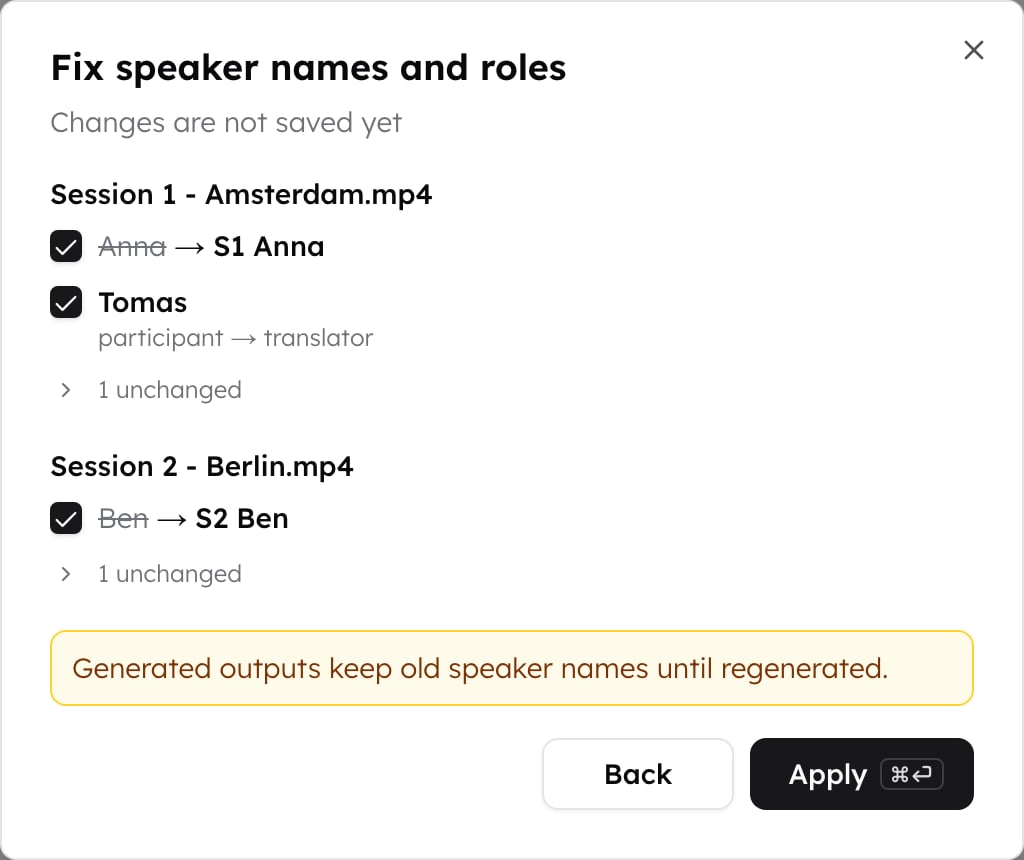
Reviewing the proposal
Every speaker in the selection is accounted for:- Changed rows show the old name struck through and the new name beside it. Role changes are listed too.
- Unchanged speakers are collapsed behind a count under each file. Expand it to see each speaker with a short reason, for example that the instruction did not say anything about it, or that the name already matches.
What applying does
Applied changes are confirmed, because reviewing the difference is the check that confirmation asks for. They apply per file, so a speaker who appears in several files is renamed only in the files you selected.Answers, themes, and other outputs generated before the rename keep the old
speaker names until you regenerate them.
Speakers who appear in several files
A speaker merged across files is decided separately for each one, so an instruction that reads file names can give that speaker a different name in each file. Renaming never merges two speakers, and never splits one: each keeps its own turns.When a name is already taken
If a proposed name is already used by another speaker in the same file, both are kept apart by numbering the later one,Amelia and Amelia (1), the same
way confirming speakers
does. The same name in two different files is left alone, since those are
separate speakers.