Review the transcription location before you start converting audio to text.
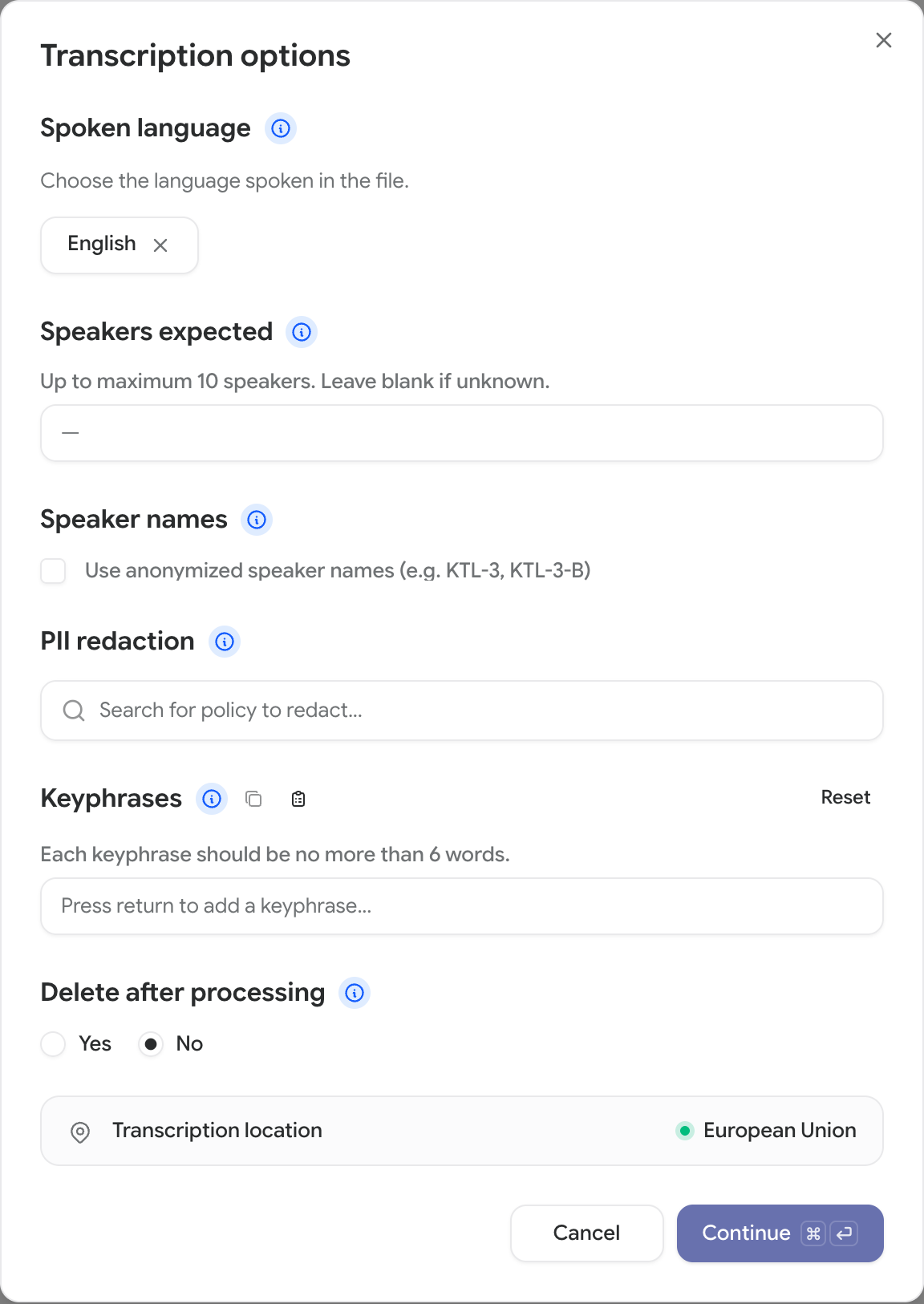
Check Transcription location in the transcription dialog before you continue. It shows where your audio will be converted to text for the settings you have selected.Your project’s storage region controls where CoLoop stores your raw files. Transcription can happen elsewhere: for example, a UK project can use EU transcription.
In Files, select your recordings and click Transcribe. For an existing transcript, open Re-do transcription from the file’s row menu.
Select the original recording language and any other transcription settings you need.
Read Transcription location. It updates when settings affect the location. If an interpreter audio location is shown, check that too.
Click Continue only if the location meets your requirements.
Location shown
What it means
United States
Audio is sent to the US transcription service.
European Union
Audio is sent to the EU transcription service.
Multiple regions
Transcription is not restricted to one country or region.
If the location does not meet your requirements, close the dialog and contact support. Include your project, recording language, and the location shown.
This location covers converting audio to text. Other steps, including media preparation, transcript correction, translation, redaction, and analysis, can run elsewhere. It does not guarantee that all processing stays in one region.
You cannot continue while the location is loading or unavailable. Click Retry if the check fails. If it still fails, contact support. If PII redaction isn’t available for the selected language, the dialog shows that reason instead of Retry; change your settings to continue.CoLoop checks the location again before sending audio for transcription. If a file would be transcribed outside the location shown, transcription stops instead of sending that audio there. This can happen when CoLoop changes the transcription service your organization uses between your review and the start of the job; contact support with the file name and the location you reviewed.
The meeting bot uses Recall.ai in the United States, regardless of your project’s storage region. Its automatic transcription does not use this dialog, so reviewing a location later does not change where the meeting was captured or initially processed.
Was this page helpful?
{"docsConfig":{"theme":"mint","$schema":"https://mintlify.com/docs.json","name":"CoLoop.ai","colors":{"primary":"#7017FF","light":"#23C2A0","dark":"#7017FF"},"logo":{"light":"https://mintcdn.com/coloop/ymQOqY80NhE9wNnz/logos/logo-black.png?fit=max\u0026auto=format\u0026n=ymQOqY80NhE9wNnz\u0026q=85\u0026s=501017bf15d7cff7dc78de97ccbe006f","dark":"https://mintcdn.com/coloop/ymQOqY80NhE9wNnz/logos/logo-white.png?fit=max\u0026auto=format\u0026n=ymQOqY80NhE9wNnz\u0026q=85\u0026s=554fc014c777c89d3ba5e41a9c42ac87"},"favicon":"https://mintcdn.com/coloop/ymQOqY80NhE9wNnz/logos/logo.svg?fit=max\u0026auto=format\u0026n=ymQOqY80NhE9wNnz\u0026q=85\u0026s=4c7d6e11e692e032a4c7e817d8cd5397","navbar":{"links":[{"href":"https://coloop-knowledge-base.help.usepylon.com","label":"Knowledge Base"},{"href":"https://app.coloop.ai","label":"Go to CoLoop"}],"primary":{"type":"button","label":"Book a Demo","href":"https://www.coloop.ai/contact?utm_source=docs\u0026utm_medium=header"}},"footer":{"socials":{"linkedin":"https://www.linkedin.com/company/coloopai"}},"integrations":{"posthog":{"apiKey":"phc_Tnk3gSqgaBU81FaieZjtfxbk3lGXC6jGGDxGyrl4z3f","apiHost":"https://eye.coloop.ai","sessionRecording":true}},"styling":{"latex":false},"navigation":{"global":{"anchors":[{"anchor":"Book a Demo","icon":"calendar-days","href":"https://www.coloop.ai/contact?utm_source=docs\u0026utm_medium=sidebar"},{"anchor":"Community","icon":"fire-flame-curved","href":"https://community.coloop.ai/users/sign_in"},{"anchor":"Back to CoLoop","icon":"house","href":"https://app.coloop.ai"}]},"pages":[]}},"deployment":{"deploymentMetadataValue":{"subdomain":"coloop","hasAudioNarration":false,"actualSubdomain":"coloop","customDomains":["docs.coloop.ai"],"gitSource":{"type":"github","owner":"genei-ltd","repo":"coloop","deployBranch":"main","contentDirectory":"apps/docs","isPrivate":true,"mountPath":"","label":""},"chroma":{"liveDeploymentHistoryId":"6aeb6e651aa1059809df1652","collectionId":"1ce252b8-2ee4-434b-9055-80f164aae48f","schemaVersion":"v3","latestBuiltDeploymentHistoryId":"6aeb6e651aa1059809df1652"},"feedback":{"thumbs":true},"entitlements":{"AI_CHAT":{"status":"ENABLED"},"REMOVE_BRANDING":{"status":"DISABLED"},"CONTEXTUAL_FEEDBACK":{"status":"DISABLED"},"CODE_SNIPPET_FEEDBACK":{"status":"DISABLED"},"WEB_MCP":{"status":"ENABLED"},"NARRATION":{"status":"ENABLED"}},"buildId":"6aeb6e651aa1059809df1652","clientVersion":"0.0.4064","searchFilterCounts":[{"language":"default","tag":"Documentation","count":70},{"language":"default","tag":"Integrations","count":38},{"language":"default","tag":"Setting up a project","count":13},{"language":"default","tag":"Collaboration \u0026 Access Management","count":11},{"language":"default","tag":"Analysis Chat","count":7},{"language":"default","tag":"AI Skills Hub","count":5},{"language":"default","tag":"Advanced Analysis","count":5},{"language":"default","tag":"Analysis Grids","count":5},{"language":"default","tag":"Getting Started","count":5},{"language":"default","tag":"API","count":4}]},"assistantConfig":{},"basePath":"","hasChatPermissions":true,"hasWebMcpPermissions":true,"toggles":[{"name":"kill-isr","enabled":true,"variant":{"name":"disabled","enabled":false,"feature_enabled":true},"impressionData":false},{"name":"agent-mintlify-slack","enabled":true,"variant":{"name":"disabled","enabled":false,"feature_enabled":true},"impressionData":false},{"name":"agent-integrations-settings","enabled":true,"variant":{"name":"disabled","enabled":false,"feature_enabled":true},"impressionData":false},{"name":"rbac-expansion","enabled":true,"variant":{"name":"disabled","enabled":false,"feature_enabled":true},"impressionData":false},{"name":"automations-pr-grouping","enabled":true,"variant":{"name":"disabled","enabled":false,"feature_enabled":true},"impressionData":false},{"name":"custom-prefix","enabled":true,"variant":{"name":"disabled","enabled":false,"feature_enabled":true},"impressionData":false},{"name":"analytics-v7","enabled":true,"variant":{"name":"disabled","enabled":false,"feature_enabled":true},"impressionData":false},{"name":"user-flows-analytics","enabled":true,"variant":{"name":"disabled","enabled":false,"feature_enabled":true},"impressionData":false},{"name":"no-publish-flow","enabled":true,"variant":{"name":"disabled","enabled":false,"feature_enabled":true},"impressionData":false},{"name":"workos-onboarding","enabled":true,"variant":{"name":"disabled","enabled":false,"feature_enabled":true},"impressionData":false},{"name":"llms-txt-v2","enabled":true,"variant":{"name":"disabled","enabled":false,"feature_enabled":true},"impressionData":false},{"name":"snapshot-serving-live","enabled":true,"variant":{"name":"disabled","enabled":false,"feature_enabled":true},"impressionData":false},{"name":"stripTemperatureMiddleware","enabled":true,"variant":{"name":"disabled","enabled":false,"feature_enabled":true},"impressionData":false},{"name":"support-platform-pylon-zendesk","enabled":true,"variant":{"name":"disabled","enabled":false,"feature_enabled":true},"impressionData":false},{"name":"snapshot-serving","enabled":true,"variant":{"name":"disabled","enabled":false,"feature_enabled":true},"impressionData":false},{"name":"instant-rollback","enabled":true,"variant":{"name":"disabled","enabled":false,"feature_enabled":true},"impressionData":false},{"name":"granular-notifications-server","enabled":true,"variant":{"name":"disabled","enabled":false,"feature_enabled":true},"impressionData":false},{"name":"granular-notifications","enabled":true,"variant":{"name":"disabled","enabled":false,"feature_enabled":true},"impressionData":false},{"name":"automations-fable","enabled":true,"variant":{"name":"disabled","enabled":false,"feature_enabled":true},"impressionData":false},{"name":"fixed-ai-action-pricing","enabled":true,"variant":{"name":"disabled","enabled":false,"feature_enabled":true},"impressionData":false},{"name":"automation-resolve-merge-conflict","enabled":true,"variant":{"name":"disabled","enabled":false,"feature_enabled":true},"impressionData":false},{"name":"scoped-publishing","enabled":true,"variant":{"name":"disabled","enabled":false,"feature_enabled":true},"impressionData":false},{"name":"mintql","enabled":true,"variant":{"name":"disabled","enabled":false,"feature_enabled":true},"impressionData":false},{"name":"page-level-analytics","enabled":true,"variant":{"name":"disabled","enabled":false,"feature_enabled":true},"impressionData":false},{"name":"editor-version-history-v2","enabled":true,"variant":{"name":"disabled","enabled":false,"feature_enabled":true},"impressionData":false},{"name":"billing-page-v2","enabled":true,"variant":{"name":"disabled","enabled":false,"feature_enabled":true},"impressionData":false},{"name":"full-page-search","enabled":true,"variant":{"name":"disabled","enabled":false,"feature_enabled":true},"impressionData":false},{"name":"workspace-projects","enabled":true,"variant":{"name":"disabled","enabled":false,"feature_enabled":true},"impressionData":false},{"name":"assistant-v5","enabled":true,"variant":{"name":"disabled","enabled":false,"feature_enabled":true},"impressionData":false},{"name":"fork-pr-previews","enabled":true,"variant":{"name":"disabled","enabled":false,"feature_enabled":true},"impressionData":false},{"name":"revalidation-jwt","enabled":true,"variant":{"name":"disabled","enabled":false,"feature_enabled":true},"impressionData":false},{"name":"vite-origin","enabled":true,"variant":{"name":"disabled","enabled":false,"feature_enabled":true},"impressionData":false},{"name":"workos-sso-scim","enabled":true,"variant":{"name":"disabled","enabled":false,"feature_enabled":true},"impressionData":false},{"name":"hobby-abuse-scan","enabled":true,"variant":{"name":"disabled","enabled":false,"feature_enabled":true},"impressionData":false},{"name":"dashboard-inbox","enabled":true,"variant":{"name":"disabled","enabled":false,"feature_enabled":true},"impressionData":false},{"name":"workos-signup","enabled":true,"variant":{"name":"disabled","enabled":false,"feature_enabled":true},"impressionData":false},{"name":"turbopuffer-dual-write","enabled":true,"variant":{"name":"disabled","enabled":false,"feature_enabled":true},"impressionData":false},{"name":"workos-enabled","enabled":true,"variant":{"name":"disabled","enabled":false,"feature_enabled":true},"impressionData":false},{"name":"approve-review-flow","enabled":true,"variant":{"name":"disabled","enabled":false,"feature_enabled":true},"impressionData":false},{"name":"sso-setup-deadline-banner","enabled":true,"variant":{"name":"disabled","enabled":false,"feature_enabled":true},"impressionData":false}],"googleFontsInlined":false},"customCss":[],"page":{"pagePath":"docs/setting-up-a-project/transcription-location","slug":"/docs/setting-up-a-project/transcription-location","pageMetadata":{"title":"Check where transcription happens","description":"Review the transcription location before you start converting audio to text.","href":"/docs/setting-up-a-project/transcription-location"},"description":{"compiledSource":"\"use strict\";\nconst {jsx: _jsx} = arguments[0];\nconst {useMDXComponents: _provideComponents} = arguments[0];\nfunction _createMdxContent(props) {\n const _components = {\n p: \"p\",\n ..._provideComponents(),\n ...props.components\n };\n return _jsx(_components.p, {\n children: \"Review the transcription location before you start converting audio to text.\"\n });\n}\nfunction MDXContent(props = {}) {\n const {wrapper: MDXLayout} = {\n ..._provideComponents(),\n ...props.components\n };\n return MDXLayout ? _jsx(MDXLayout, {\n ...props,\n children: _jsx(_createMdxContent, {\n ...props\n })\n }) : _createMdxContent(props);\n}\nreturn {\n default: MDXContent\n};\n","frontmatter":{},"scope":{}},"pageType":"default","mdx":{"mdxSource":{"compiledSource":"\"use strict\";const{Fragment:_Fragment,jsx:_jsx,jsxs:_jsxs}=arguments[0];const{useMDXComponents:_provideComponents}=arguments[0];function _createMdxContent(props){const _components={a:`a`,li:`li`,ol:`ol`,p:`p`,strong:`strong`,tbody:`tbody`,td:`td`,th:`th`,thead:`thead`,tr:`tr`,..._provideComponents(),...props.components},{Heading,Info,OptimizedImage,Table}=_components;if(!Heading)_missingMdxReference(`Heading`,true);if(!Info)_missingMdxReference(`Info`,true);if(!OptimizedImage)_missingMdxReference(`OptimizedImage`,true);if(!Table)_missingMdxReference(`Table`,true);return _jsxs(_Fragment,{children:[_jsxs(_components.p,{children:[`Check `,_jsx(_components.strong,{children:`Transcription location`}),` in the transcription dialog before you continue. It shows where your audio will be converted to text for the settings you have selected.`]}),`\n`,_jsxs(_components.p,{children:[`Your project’s `,_jsx(_components.a,{href:`/docs/collab-and-access-management/data-residency`,children:`storage region`}),` controls where CoLoop stores your raw files. Transcription can happen elsewhere: for example, a UK project can use EU transcription.`]}),`\n`,_jsx(Heading,{level:`2`,id:`check-the-location-before-continuing`,children:`Check the location before continuing`}),`\n`,_jsxs(_components.ol,{children:[`\n`,_jsxs(_components.li,{children:[`In `,_jsx(_components.strong,{children:`Files`}),`, select your recordings and click `,_jsx(_components.strong,{children:`Transcribe`}),`. For an existing transcript, open `,_jsx(_components.strong,{children:`Re-do transcription`}),` from the file’s row menu.`]}),`\n`,_jsx(_components.li,{children:`Select the original recording language and any other transcription settings you need.`}),`\n`,_jsxs(_components.li,{children:[`Read `,_jsx(_components.strong,{children:`Transcription location`}),`. It updates when settings affect the location. If an interpreter audio location is shown, check that too.`]}),`\n`,_jsxs(_components.li,{children:[`Click `,_jsx(_components.strong,{children:`Continue`}),` only if the location meets your requirements.`]}),`\n`]}),`\n`,_jsxs(Table,{children:[_jsx(_components.thead,{children:_jsxs(_components.tr,{children:[_jsx(_components.th,{children:`Location shown`}),_jsx(_components.th,{children:`What it means`})]})}),_jsxs(_components.tbody,{children:[_jsxs(_components.tr,{children:[_jsx(_components.td,{children:`United States`}),_jsx(_components.td,{children:`Audio is sent to the US transcription service.`})]}),_jsxs(_components.tr,{children:[_jsx(_components.td,{children:`European Union`}),_jsx(_components.td,{children:`Audio is sent to the EU transcription service.`})]}),_jsxs(_components.tr,{children:[_jsx(_components.td,{children:`Multiple regions`}),_jsx(_components.td,{children:`Transcription is not restricted to one country or region.`})]})]})]}),`\n`,_jsx(OptimizedImage,{src:`https://cdn.coloop.ai/mintlify-coloop-docs/images/docs-assets/setting-up/transcription-location.png`,alt:`Transcription dialog showing European Union as the transcription location, above the Continue button`,style:{borderRadius:`6px`}}),`\n`,_jsxs(_components.p,{children:[`If the location does not meet your requirements, close the dialog and `,_jsx(_components.a,{href:`/docs/troubleshooting/contact-support`,children:`contact support`}),`. Include your project, recording language, and the location shown.`]}),`\n`,_jsx(Info,{children:_jsx(_components.p,{children:`This location covers converting audio to text. Other steps, including media preparation, transcript correction, translation, redaction, and analysis, can run elsewhere. It does not guarantee that all processing stays in one region.`})}),`\n`,_jsx(Heading,{level:`2`,id:`if-coloop-cannot-confirm-the-location`,children:`If CoLoop cannot confirm the location`}),`\n`,_jsxs(_components.p,{children:[`You cannot continue while the location is loading or unavailable. Click `,_jsx(_components.strong,{children:`Retry`}),` if the check fails. If it still fails, contact support. If PII redaction isn’t available for the selected language, the dialog shows that reason instead of `,_jsx(_components.strong,{children:`Retry`}),`; change your settings to continue.`]}),`\n`,_jsx(_components.p,{children:`CoLoop checks the location again before sending audio for transcription. If a file would be transcribed outside the location shown, transcription stops instead of sending that audio there. This can happen when CoLoop changes the transcription service your organization uses between your review and the start of the job; contact support with the file name and the location you reviewed.`}),`\n`,_jsx(Heading,{level:`2`,id:`if-you-use-the-meeting-bot`,children:`If you use the meeting bot`}),`\n`,_jsxs(_components.p,{children:[`The `,_jsx(_components.a,{href:`/docs/recording-live-interviews/getting-started`,children:`meeting bot`}),` uses Recall.ai in the United States, regardless of your project’s storage region. Its automatic transcription does not use this dialog, so reviewing a location later does not change where the meeting was captured or initially processed.`]})]})}function MDXContent(props={}){const{wrapper:MDXLayout}={..._provideComponents(),...props.components};return MDXLayout?_jsx(MDXLayout,{...props,children:_jsx(_createMdxContent,{...props})}):_createMdxContent(props)}return{default:MDXContent};function _missingMdxReference(id,component){throw new Error(`Expected `+(component?`component`:`object`)+\" `\"+id+\"` to be defined: you likely forgot to import, pass, or provide it.\")}","frontmatter":{},"scope":{"config":{},"pageMetadata":{"title":"Check where transcription happens","description":"Review the transcription location before you start converting audio to text.","href":"/docs/setting-up-a-project/transcription-location"}}},"mdxSourceWithNoJs":null},"mdxExtracts":{"tableOfContents":[{"title":"Check the location before continuing","slug":"check-the-location-before-continuing","depth":2,"children":[]},{"title":"If CoLoop cannot confirm the location","slug":"if-coloop-cannot-confirm-the-location","depth":2,"children":[]},{"title":"If you use the meeting bot","slug":"if-you-use-the-meeting-bot","depth":2,"children":[]}],"codeExamples":{}},"jsLinks":[],"subdomain":"coloop","siteName":"CoLoop.ai","title":"Check where transcription happens - CoLoop.ai","navMaps":{"firstHrefInVersion":{},"firstHrefInLanguage":{}},"lastModified":"2026-11-04T17:42:02.403Z","originalFileLocation":"docs/setting-up-a-project/transcription-location.mdx"},"headHtml":"\u003cscript data-mint-head>(function(){var d=document.documentElement,p=null;if(!p){try{p=localStorage.getItem(\"isDarkMode\")}catch(e){}if(p==='true')p='dark';else if(p==='false')p='light';if(p!=='light'\u0026\u0026p!=='dark'\u0026\u0026p!=='system')p=\"system\"}var r=p==='system'?(matchMedia(\"(prefers-color-scheme: dark)\").matches?'dark':'light'):p;d.classList.remove(r==='dark'?'light':'dark');d.classList.add(r);d.setAttribute(\"data-theme-preference\",p)})();\u003c/script>\u003cmeta data-mint-head name=\"description\" content=\"Review the transcription location before you start converting audio to text.\">\u003cmeta data-mint-head name=\"application-name\" content=\"CoLoop.ai\">\u003cmeta data-mint-head name=\"generator\" content=\"Mintlify\">\u003clink data-mint-head rel=\"icon\" type=\"image/png\" sizes=\"192x192\" href=\"/mintlify-assets/_mintlify/favicons/coloop/FtJam5eu_ZqK6AyR/_generated/favicon/android-chrome-192x192.png\" media=\"(prefers-color-scheme: light)\">\u003clink data-mint-head rel=\"apple-touch-icon\" type=\"image/png\" sizes=\"180x180\" href=\"/mintlify-assets/_mintlify/favicons/coloop/FtJam5eu_ZqK6AyR/_generated/favicon/apple-touch-icon.png\">\u003clink data-mint-head rel=\"icon\" type=\"image/png\" sizes=\"16x16\" href=\"/mintlify-assets/_mintlify/favicons/coloop/FtJam5eu_ZqK6AyR/_generated/favicon/favicon-16x16.png\" media=\"(prefers-color-scheme: light)\">\u003clink data-mint-head rel=\"icon\" type=\"image/png\" sizes=\"32x32\" href=\"/mintlify-assets/_mintlify/favicons/coloop/FtJam5eu_ZqK6AyR/_generated/favicon/favicon-32x32.png\" media=\"(prefers-color-scheme: light)\">\u003clink data-mint-head rel=\"shortcut icon\" type=\"image/x-icon\" href=\"/mintlify-assets/_mintlify/favicons/coloop/FtJam5eu_ZqK6AyR/_generated/favicon/favicon.ico\" media=\"(prefers-color-scheme: light)\">\u003clink data-mint-head rel=\"icon\" type=\"image/png\" sizes=\"192x192\" href=\"/mintlify-assets/_mintlify/favicons/coloop/FtJam5eu_ZqK6AyR/_generated/favicon-dark/android-chrome-192x192.png\" media=\"(prefers-color-scheme: dark)\">\u003clink data-mint-head rel=\"icon\" type=\"image/png\" sizes=\"16x16\" href=\"/mintlify-assets/_mintlify/favicons/coloop/FtJam5eu_ZqK6AyR/_generated/favicon-dark/favicon-16x16.png\" media=\"(prefers-color-scheme: dark)\">\u003clink data-mint-head rel=\"icon\" type=\"image/png\" sizes=\"32x32\" href=\"/mintlify-assets/_mintlify/favicons/coloop/FtJam5eu_ZqK6AyR/_generated/favicon-dark/favicon-32x32.png\" media=\"(prefers-color-scheme: dark)\">\u003clink data-mint-head rel=\"shortcut icon\" type=\"image/x-icon\" href=\"/mintlify-assets/_mintlify/favicons/coloop/FtJam5eu_ZqK6AyR/_generated/favicon-dark/favicon.ico\" media=\"(prefers-color-scheme: dark)\">\u003cmeta data-mint-head property=\"og:title\" content=\"Check where transcription happens - CoLoop.ai\">\u003cmeta data-mint-head property=\"og:description\" content=\"Review the transcription location before you start converting audio to text.\">\u003cmeta data-mint-head property=\"og:site_name\" content=\"CoLoop.ai\">\u003cmeta data-mint-head property=\"og:url\" content=\"https://docs.coloop.ai/docs/setting-up-a-project/transcription-location\">\u003cmeta data-mint-head property=\"og:type\" content=\"website\">\u003cmeta data-mint-head property=\"og:image\" content=\"https://coloop.mintlify.app/_mintlify/api/og/v2?division=Setting+up+a+project\u0026amp;title=Check+where+transcription+happens\u0026amp;description=Review+the+transcription+location+before+you+start+converting+audio+to+text.\u0026amp;theme=cb5d633f518c0610a929dff8\u0026amp;signature=5b31dcd083bdba49378a8cf057a089bf837c6246869ef11e189a820bc8170d84\">\u003cmeta data-mint-head property=\"og:image:width\" content=\"1200\">\u003cmeta data-mint-head property=\"og:image:height\" content=\"630\">\u003cmeta data-mint-head name=\"twitter:card\" content=\"summary_large_image\">\u003cmeta data-mint-head name=\"twitter:title\" content=\"Check where transcription happens - CoLoop.ai\">\u003cmeta data-mint-head name=\"twitter:description\" content=\"Review the transcription location before you start converting audio to text.\">\u003cmeta data-mint-head name=\"twitter:image\" content=\"https://coloop.mintlify.app/_mintlify/api/og/v2?division=Setting+up+a+project\u0026amp;title=Check+where+transcription+happens\u0026amp;description=Review+the+transcription+location+before+you+start+converting+audio+to+text.\u0026amp;theme=cb5d633f518c0610a929dff8\u0026amp;signature=5b31dcd083bdba49378a8cf057a089bf837c6246869ef11e189a820bc8170d84\">\u003cmeta data-mint-head name=\"twitter:image:width\" content=\"1200\">\u003cmeta data-mint-head name=\"twitter:image:height\" content=\"630\">\u003cmeta data-mint-head name=\"msapplication-config\" content=\"/mintlify-assets/_mintlify/favicons/coloop/FtJam5eu_ZqK6AyR/_generated/favicon/browserconfig.xml\">\u003cmeta data-mint-head name=\"apple-mobile-web-app-title\" content=\"CoLoop.ai\">\u003cmeta data-mint-head name=\"msapplication-TileColor\" content=\"#7017FF\">\u003clink data-mint-head rel=\"canonical\" href=\"https://docs.coloop.ai/docs/setting-up-a-project/transcription-location\">\u003clink data-mint-head rel=\"alternate\" type=\"application/xml\" href=\"/sitemap.xml\">\u003clink data-mint-head rel=\"alternate\" type=\"text/markdown\" href=\"/docs/setting-up-a-project/transcription-location.md\">\u003cscript data-mint-head type=\"application/ld+json\">{\"@context\":\"https://schema.org\",\"@graph\":[{\"@type\":\"Organization\",\"@id\":\"https://docs.coloop.ai/#organization\",\"name\":\"CoLoop.ai\",\"url\":\"https://docs.coloop.ai\",\"logo\":{\"@type\":\"ImageObject\",\"url\":\"https://mintcdn.com/coloop/ymQOqY80NhE9wNnz/logos/logo-black.png?fit=max\u0026auto=format\u0026n=ymQOqY80NhE9wNnz\u0026q=85\u0026s=501017bf15d7cff7dc78de97ccbe006f\"}},{\"@type\":\"WebSite\",\"@id\":\"https://docs.coloop.ai#website\",\"name\":\"CoLoop.ai\",\"url\":\"https://docs.coloop.ai\",\"publisher\":{\"@id\":\"https://docs.coloop.ai/#organization\"}},{\"@type\":\"WebPage\",\"@id\":\"https://docs.coloop.ai/docs/setting-up-a-project/transcription-location#webpage\",\"url\":\"https://docs.coloop.ai/docs/setting-up-a-project/transcription-location\",\"name\":\"Check where transcription happens\",\"description\":\"Review the transcription location before you start converting audio to text.\",\"dateModified\":\"2026-11-04T17:42:02.403Z\",\"isPartOf\":{\"@id\":\"https://docs.coloop.ai#website\"},\"breadcrumb\":{\"@id\":\"https://docs.coloop.ai/docs/setting-up-a-project/transcription-location#breadcrumb\"}},{\"@type\":\"BreadcrumbList\",\"@id\":\"https://docs.coloop.ai/docs/setting-up-a-project/transcription-location#breadcrumb\",\"itemListElement\":[{\"@type\":\"ListItem\",\"position\":1,\"name\":\"Setting up a project\",\"item\":\"https://docs.coloop.ai/docs/setting-up-a-project/create-a-project\"},{\"@type\":\"ListItem\",\"position\":2,\"name\":\"Check where transcription happens\",\"item\":\"https://docs.coloop.ai/docs/setting-up-a-project/transcription-location\"}]},{\"@type\":[\"Article\",\"TechArticle\"],\"@id\":\"https://docs.coloop.ai/docs/setting-up-a-project/transcription-location#article\",\"headline\":\"Check where transcription happens\",\"name\":\"Check where transcription happens\",\"description\":\"Review the transcription location before you start converting audio to text.\",\"url\":\"https://docs.coloop.ai/docs/setting-up-a-project/transcription-location\",\"mainEntityOfPage\":{\"@id\":\"https://docs.coloop.ai/docs/setting-up-a-project/transcription-location#webpage\"},\"dateModified\":\"2026-11-04T17:42:02.403Z\",\"publisher\":{\"@id\":\"https://docs.coloop.ai/#organization\"},\"isPartOf\":{\"@id\":\"https://docs.coloop.ai#website\"}}]}\u003c/script>\u003cscript data-mint-head type=\"application/ld+json\">{\"@context\":\"https://schema.org\",\"@type\":\"WebSite\",\"name\":\"CoLoop.ai\",\"creator\":{\"@type\":\"Organization\",\"name\":\"Mintlify\",\"url\":\"https://mintlify.com\"}}\u003c/script>","siteName":"CoLoop.ai","nav":{"global":{"anchors":[{"anchor":"Book a Demo","icon":"calendar-days","href":"https://www.coloop.ai/contact?utm_source=docs\u0026utm_medium=sidebar"},{"anchor":"Community","icon":"fire-flame-curved","href":"https://community.coloop.ai/users/sign_in"},{"anchor":"Back to CoLoop","icon":"house","href":"https://app.coloop.ai"}]},"tabs":[{"tab":"Documentation","groups":[{"group":"Getting Started","pages":[{"title":"Introduction","icon":"handshake-angle","href":"/docs/getting-started/introduction"},{"title":"Live Interviews","icon":"microphone","href":"/docs/getting-started/live-interviews"},{"title":"Online Qualitative","icon":"globe","href":"/docs/getting-started/online-qual"},{"title":"Concept \u0026 Message Testing","icon":"magnifying-glass","href":"/docs/getting-started/concept-testing-mode"},{"title":"Multimarket studies","icon":"language","href":"/docs/getting-started/multi-market-studies"}]},{"group":"Setting up a project","pages":[{"title":"Creating projects","href":"/docs/setting-up-a-project/create-a-project"},{"title":"Finding and organizing projects","href":"/docs/setting-up-a-project/projects-list"},{"title":"Uploading data \u0026 creating transcripts","description":"This document will take you through how to upload files, optimize settings for transcription, label speakers, and utilize additional features like transcript correction and translation to enhance qualitative research efficiency.","href":"/docs/setting-up-a-project/create-a-transcript"},{"title":"Check where transcription happens","href":"/docs/setting-up-a-project/transcription-location"},{"title":"Translating transcripts","description":"Learn how to transcribe your files from a non-English language in CoLoop. ","href":"/docs/setting-up-a-project/translation"},{"title":"Import simultaneous translation","href":"/docs/setting-up-a-project/simultaneous-translation"},{"title":"Import a translated transcript","href":"/docs/setting-up-a-project/import-a-translated-transcript"},{"title":"Supported languages","href":"/docs/setting-up-a-project/supported-languages"},{"title":"Language quality","href":"/docs/setting-up-a-project/language-quality"},{"title":"Adding segments","href":"/docs/setting-up-a-project/segments"},{"title":"Confirming speakers","href":"/docs/setting-up-a-project/confirming-speakers"},{"title":"Fixing speaker names and roles","href":"/docs/setting-up-a-project/fixing-speaker-naming"},{"title":"Setting up multi-market studies","href":"/docs/setting-up-a-project/setting-up-multi-market"}]},{"group":"Concept Testing","pages":[{"title":"Concept Testing","href":"/docs/concept-testing/overview"},{"title":"Concept Testing with No Stimulus Deck","href":"/docs/concept-testing/tagging-concepts-no-slide-deck"},{"title":"Stimulus Deck Concept Testing","href":"/docs/concept-testing/stimulus-deck-concept-testing"},{"title":"Analyzing Concepts","href":"/docs/concept-testing/analysing-concepts"}]},{"group":"Analysis Grids","pages":[{"title":"Analysis Grids","href":"/docs/analysis/analysis-grids"},{"title":"AI Grids Chat","href":"/docs/analysis/ai-grids-chat"},{"title":"Content Analysis Reports","href":"/docs/analysis/content-analysis-reports"},{"group":"Legacy grids","pages":[{"title":"Basic Grids","href":"/docs/analysis/basic-grid"},{"title":"Comparative Grids","href":"/docs/analysis/comparative-grids"}]}]},{"group":"Analysis Chat","pages":[{"title":"Thought Partner Chat","href":"/docs/analysis/thought-partner-chat"},{"title":"Quote Finding Chat","href":"/docs/analysis/quote-finding-chat"},{"title":"Adding Files \u0026 Images to Chat","href":"/docs/analysis/uploading-files-to-chat"},{"title":"Skills","href":"/docs/analysis/skills"},{"title":"Evidence Panels","href":"/docs/analysis/evidence-panels"},{"group":"Legacy chats","pages":[{"title":"Chat 1.0","href":"/docs/analysis/chat-1.0"},{"title":"Chat 2.0","href":"/docs/analysis/chat-2.0"}]}]},{"group":"Tips \u0026 Outputs","pages":[{"title":"Top Tips and Prompting Advice","href":"/docs/analysis/top-tips-and-prompting-advice"},{"title":"Topline Summaries","href":"/docs/analysis/writing-a-good-topline"},{"title":"Creating Clips and Reels","href":"/docs/analysis/creating-clips"}]},{"group":"Supported File Formats","pages":[{"title":"Video \u0026 Audio","href":"/docs/file-formats/video-audio"},{"title":"Spreadsheets","href":"/docs/file-formats/excel"},{"title":"DOCX \u0026 TXT Transcripts","href":"/docs/file-formats/docx"},{"title":"Community Data","href":"/docs/file-formats/community-data"}]},{"group":"Open Ends Analysis","pages":[{"title":"Setting up an Open Ends Project","href":"/docs/open-ends/open-ends-project-set-up"},{"title":"Analysing Open Ends Data","href":"/docs/open-ends/open-ends-analysis"},{"title":"Excel Formatting for Open Ends","href":"/docs/open-ends/excel-import-format"},{"title":"Uploading Additional Waves of Data in Open Ends","href":"/docs/open-ends/additional-waves"}]},{"group":"Adverse Events","pages":[{"title":"Detect and review adverse events","href":"/docs/adverse-events/detect-and-review"}]},{"group":"Collaboration \u0026 Access Management","pages":[{"title":"Managing an Organisation","href":"/docs/collab-and-access-management/managing-an-org"},{"title":"Managing Seats","href":"/docs/collab-and-access-management/managing-seats"},{"title":"Organisation Auto-Join","href":"/docs/collab-and-access-management/auto-join-organisation"},{"title":"Sharing Projects","href":"/docs/collab-and-access-management/sharing-projects"},{"title":"Transfer a Project Copy","href":"/docs/collab-and-access-management/transferring-projects"},{"title":"Sharing Analysis Grids \u0026 AI Chats","href":"/docs/collab-and-access-management/sharing-analysis-grids-ai-chats"},{"title":"Managing Project Visibility ","href":"/docs/collab-and-access-management/managing-visibillity"},{"title":"Guest Access","href":"/docs/collab-and-access-management/guest-access"},{"title":"Client Access","href":"/docs/collab-and-access-management/client-access"},{"title":"Enforcing a Storage Region","sidebarTitle":"Data Residency","href":"/docs/collab-and-access-management/data-residency"},{"title":"Getting Notified About New Projects","sidebarTitle":"Notifications","href":"/docs/collab-and-access-management/notifications"}]},{"group":"Recording Live Interviews","pages":[{"title":"Recording Using CoLoop","href":"/docs/recording-live-interviews/getting-started"},{"title":"Troubleshooting","href":"/docs/recording-live-interviews/troubleshooting"}]},{"group":"Compliance","pages":[{"title":"Security \u0026 Ethics - how does CoLoop remain secure","sidebarTitle":"Security \u0026 Ethics","href":"/docs/compliance/security-and-ethics"},{"title":"What happens to my data when I upload it to CoLoop?","sidebarTitle":"Your Data","href":"/docs/compliance/coloop-and-my-data"},{"title":"Participants Anonymization","sidebarTitle":"Participants Anonymization","href":"/docs/compliance/participants-anonymization"}]},{"group":"Troubleshooting","pages":[{"title":"Contact Support","href":"/docs/troubleshooting/contact-support"},{"title":"Network setup for IT","href":"/docs/troubleshooting/network-requirements"},{"title":"Ask the Community","href":"/docs/troubleshooting/ask-the-community"},{"title":"FAQs","href":"/docs/troubleshooting/faqs"}]},{"group":"API","pages":[{"title":"Getting Started","href":"/docs/api/getting-started"},{"title":"Managing API Keys","href":"/docs/api/managing-api-keys"},{"group":"Authentication","pages":[{"title":"OAuth Application Setup","href":"/docs/api/authentication/setup"},{"title":"OAuth Flow","href":"/docs/api/authentication/flow"}]}]}]},{"tab":"Integrations","pages":[{"title":"Integrations","href":"/integration/integration/zoom"}]},{"tab":"AI Skills Hub","pages":[{"title":"AI Skills Hub","href":"/ai-skills-hub/advanced-analysis/ai-chat-vs-ai-grids"}]}]},"basePath":"","title":"Check where transcription happens - CoLoop.ai","buildId":"dpl_2gSLkbMoF5kkLsBqYzq9KWtDyJRo","deploymentId":"dpl_2gSLkbMoF5kkLsBqYzq9KWtDyJRo","dynamics":["a74be98ba7"],"chunks":["zoom-image-lightbox-DR0NJNUZ.js","lightbox-handle-r17bVUz3.js"]}


 If the location does not meet your requirements, close the dialog and contact support. Include your project, recording language, and the location shown.